

The following blog was meant to be part of my Sonar with SAP Java series originally published at SCN, but somehow it was never published. So, here we go, some more information on Sonar and SAP Java, including findbug for code quality checks.
Sonar needs to be fed with data. From inside Sonar you cannot define a path with files to be analyzed. The task to send files is up to the developer (or a kind of software). Yes, in that case the developer can be replaced by a script. The process for loading the data to be analyzed is described in great detail at the Sonar homepage. I’m using ant for this. I created a stub build.xml file for my needs that does the compilation of SAP Portal PAR and EAR archives.
<sonar:sonar workDir=”.” key=“com.tobias.km.par:KmListFiles” version=“1.0” xmlns:sonar=“antlib:org.sonar.ant”>
</sonar:sonar>
Complete ant file
<project basedir=”.” default=“par” name=“UserList”>
<path id=“project.classpath”>
<taskdef uri=“antlib:org.sonar.ant” resource=“org/sonar/ant/antlib.xml”>
<target name=“sonar”>
<path id=“sap.jars”>
<sonar:sonar workDir=”.” key=“com.tobias.km.par:KmListFiles” version=“1.0” xmlns:sonar=“antlib:org.sonar.ant”>
</sonar:sonar>
<path id=“compile.classpath”>
<fileset dir=“C:\Dev\jar”>
<target name=“init”>
<target name=“compile” depends=“init” >
<javac destdir=“build/classes” debug=“true” srcdir=“src.core”>
<target name=“par” depends=“compile”>
<war destfile=“dist_temp/${name.par}” webxml=“dist/PORTAL-INF/portalapp.xml”>
<copy includeemptydirs=“false” todir=”./”>
<fileset dir=“dist_temp”>
Load all necessary JARs == make them available to findbugs.
<path id=“sap.jars”>
Activate findbugs in Sonar:

- Sonar way with Findbugs
Example code that triggers a blocker in findbugs:
Object o = null;
public String foo(Object o) {
if (Integer.class.isInstance(o)) {
return (String) o;
}
return "";
}
String a = foo(o);
The code won’t work as o is null, but will compile. Instead of deploying that code and then be surprised why an exception occurred during runtime, let Sonar and findbugs let do this.
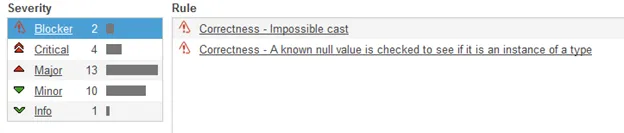
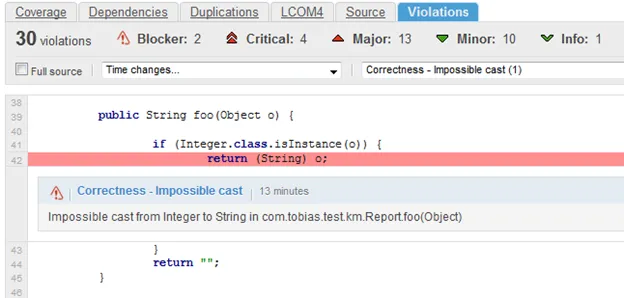
Nice thing from findbug is that it tracks the values of variables and objects.
Object o = null;
if (o instanceof IPortalComponentRequest) {}
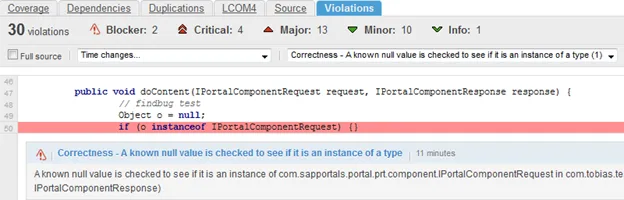
Findbug identifies that we are going to check a null value.
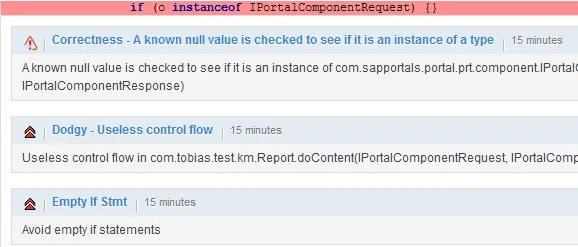
Findbug even analyzes the code further and gives for the same line of code more information:
And without findbugs? What does sonar find from just looking at the source code?
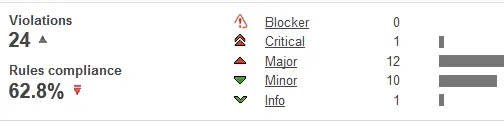
No more blockers and the rules compliance went up from 35% to 63%. From the source code analysis Sonar is able to identify serious problems too, but to get the most out of the analysis findbug should also be activated.
The critical error shows only the empty if statement:

So no value tracking and identifying of possible NullPointerExceptions. And these are the ones that are really annoying as they can be predicted but finding them can be a tedious task.