When you decide to analyze your source code with a quality tool like SonarQube, sooner or later you will get messages about trailing white spaces or to replace tab with white spaces. The severity is minor and if you now use tab or white space for indentation has no effect whatsoever on my final code. At the end I run grunt and uglify over the code and unnecessary spaces are eliminated. But you may get into other problems with space / tab:
- Git code review
- Changes between operating systems (Linux, Windows)
- Unreadable code when opened in Wordpad / Notepad / vim
- Tab is normally 4 white spaces, but when defined differently on a computer, code gets really unreadable
- Angry developers in endless flame wars
Now, what do to when SonarQube is showing minor problems caused by tabs?

This is caused that by default Eclipse is using tabs to indent code. You cannot change the default profile, but you can define your own. To do so, follow these steps:
-
Create a new profile
Windows -> Preferences
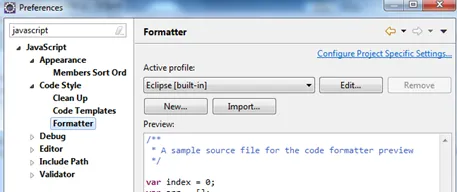
Click on New…
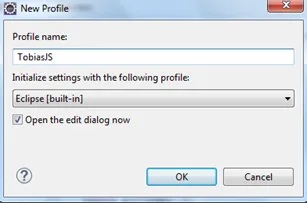
Inform a nice profile name.
-
Alter indentation
Change the tab and white space setting.
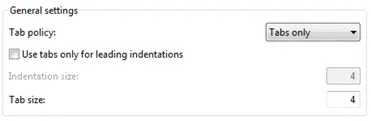
Change tab policy to spaces only
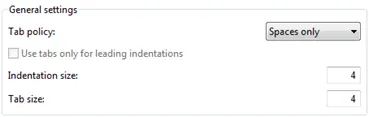
To apply the new profile to an already edited file, you can open the file and re-format it (CTRL+SHIT+F). Running a new SonarQube analysis eliminates the white space errors: