The configuration steps to be executed on the HUB system (FND) are detailed at SAP Help 🔗. The steps are for the OData Channel Service for backend system.
-
Basic configuration activities: SAP Help 🔗
- Set profile parameters to support SSO2 SAP Help 🔗
- Activate ICF Services SAP Help 🔗
-
User & Authorization SAP Help 🔗
-
SAP Gateway to Consumer (FND to SMP3) SAP Help 🔗
- Creating a bgRFC destination for outbound queues SAP Help 🔗
- Registering bgRFC destination for the oubound queue SAP Help 🔗
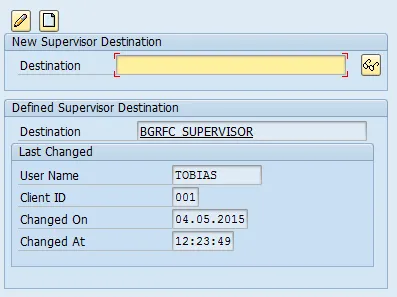
- Creating bgRFC supervisor destination SAP Help 🔗
-
SAP Gateway to SAP Backend (FND to BEP) SAP Help 🔗
- Create RFC on SAP Gateway (FND) to SAP backend (BEP) SAP Help 🔗
- Define trust between SAP Gateway and SAP backend (FND <-> BEP) SAP Help 🔗
- Configure SAP backend system (BEP) to accept assertion ticket from SAP Gateway SAP Help 🔗
- Configure SAP Gateway (FND) to accept assertion ticket from SAP backend (BEP) SAP Help 🔗
- Configure SAP system alias for applications SAP Help 🔗
-
Activate SAP NetWeaver Gateway SAP Help 🔗
This document explains how to execute step 3.3.
“The supervisor destination for bgRFC receives the configuration settings for the bgRFC scheduler and also starts or stops the schedulers as required.” SAP Help 🔗
SPRO_: SAP Reference IMG_ and navigate to:  SAP NetWeaver
  Gateway OData Channel Configuration Connection Settings SAP NetWeaver Gateway to Consumer Create bgRFC Supervisor Destination
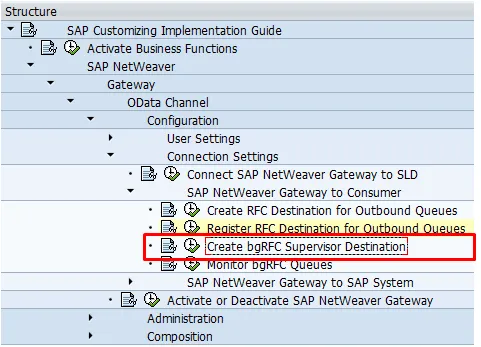
This open transaction SBGRFCCONF
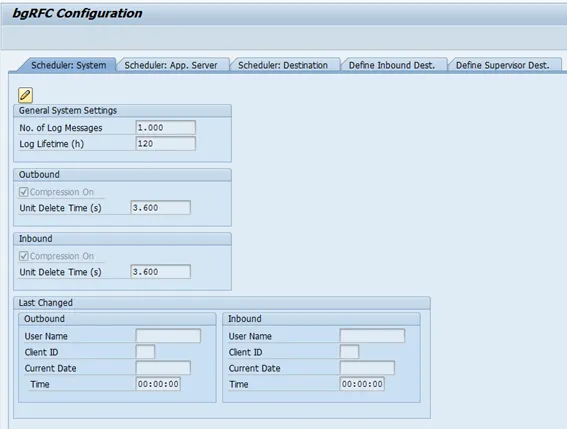
-
Go to tab “Define Supervisor Dest.”
-
Create
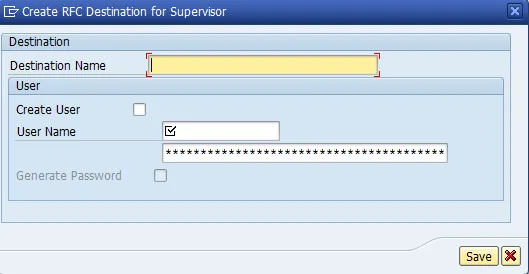
-
Destination Name: BGRFC_SUPERVISOR
-
User name: user name
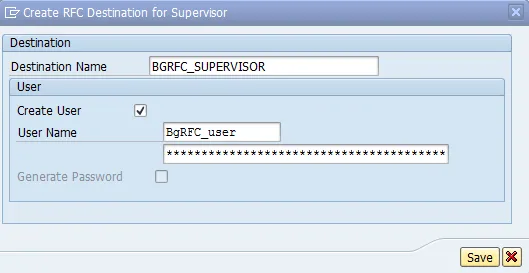
- Save
- Select “Generate Password”
- Save