

The configuration steps to be executed on the HUB system (FND) are detailed at SAP Help 🔗. The steps are for the OData Channel Service for backend system.
-
Basic configuration activities: SAP Help 🔗
- Set profile parameters to support SSO2 SAP Help 🔗
- Activate ICF Services SAP Help 🔗
-
User & Authorization SAP Help 🔗
-
SAP Gateway to Consumer (FND to SMP3) SAP Help 🔗
- Creating a bgRFC destination for outbound queues SAP Help 🔗
- Registering bgRFC destination for the oubound queue SAP Help 🔗
- Creating bgRFC supervisor destination SAP Help 🔗
-
SAP Gateway to SAP Backend (FND to BEP) SAP Help 🔗
- Create RFC on SAP Gateway (FND) to SAP backend (BEP) SAP Help 🔗
- Define trust between SAP Gateway and SAP backend (FND <-> BEP) SAP Help 🔗
- Configure SAP backend system (BEP) to accept assertion ticket from SAP Gateway SAP Help 🔗
- Configure SAP Gateway (FND) to accept assertion ticket from SAP backend (BEP) SAP Help 🔗
- Configure SAP system alias for applications SAP Help 🔗
-
Activate SAP NetWeaver Gateway SAP Help 🔗
This document explains how to execute step 4.5.
Incoming OData request can be handled locally by the Gateway system or redirected to an SAP Backend. In a HUB installation, the OData service backend is a diferente SAP system (BEP), therefore an alias is needed to define to which backend a OData service should be redirected to. SAP Help 🔗
The alias defined here will be used in the maintain odata services transaction to assign a backend to a service.
SPRO: S_AP Reference IMG_ and navigate to:  SAP NetWeaver
  Gateway OData Channel Configuration Connection Settings SAP NetWeaver Gateway to SAP System Manage SAP System Aliases
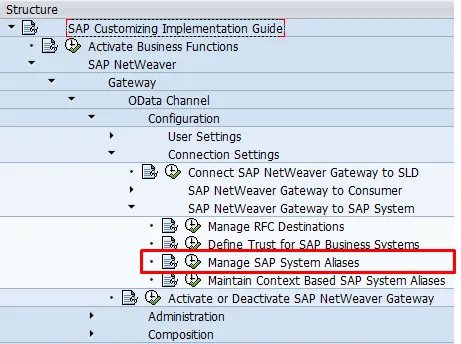
The program to manage SAP system alises opens.

- Create a new entry

- Enter the corresponding data for the SAP backend
- SAP System Alias: ECC
- Description: BEP backend
- Local GW: No
- For Local App: No
- RFC Destination: ECCCLNT001
- Software Version: DEFAULT
- System ID: ECC
- Client: 001
- WS Provider system: empty

- Save