The configuration steps to be executed on the HUB system (FND) are detailed at SAP Help 🔗.
- Maintaining Inbound bgRFC Queue on the Hub System SAP Help 🔗
- Create outbound destination for content publisher SAP Help 🔗
This document explains how to execute step 2.
When a mobile user subscripes for push notification, he/she basically informs SAP Gateway to receive updates on a collection. As Gateway handles subscriptions in a pretty abstract way, the user needs to inform some information during the subscription process. One of these informations is the communication channel. This channel corresponds to a HTTP destination created at the HUB system. SAP Help 🔗
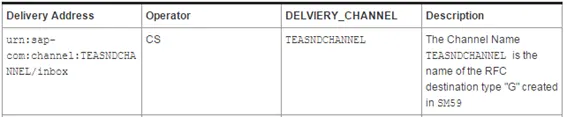
A user subscribing will pass the following channel information to Gateway: urn:sap-com:channel:<CHANNEL_NAME>/<unique_ID_of_device
The first part (urn:sap-com:channel) is used by OData as a keyword to filter and extract the name of the channel. The channel name is a HTTP destination created in SM59. I’ll use SMP_PUSH. This implies that you can have several push destinations for a single SAP Gateway system.
No SPRO activity
All activities are done on the SAP Gateway HUB (FND) system.
-
Create HTTP Destination
-
Transaction SM59
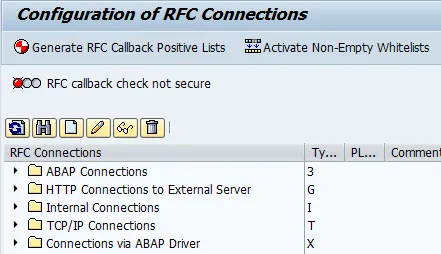
-
New Destination
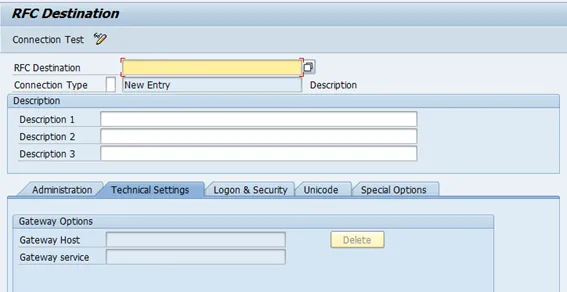
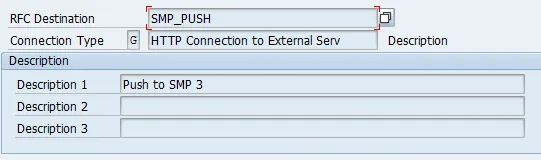
- RFC Destination: SMP_PUSH
- Connection Type: G
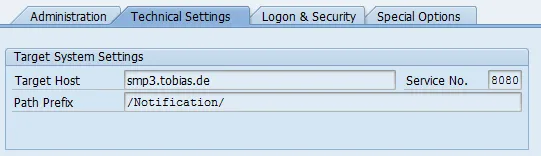
- Go to tab “Technical Settings”
- Target host: Host of SMP 3 (smp3.tobias.de)
- Service No: HTTP Port of SMP 3 (8080, depends on your configuration)
- Path Prefix: Prefix used by SMP 3 for push notifications (/Notification/)
-
Go to tab “Logon & Security”
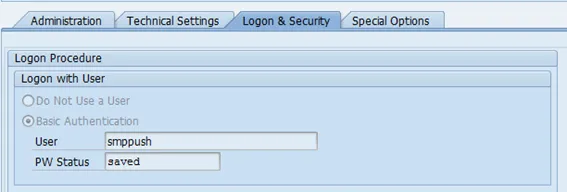
- User: SMP Push user (smppush)
- Password: password of SMP Push user
-
Save
-
Test destination