

After enabling OCB features, you should check if folders and files are correctly available in SMP3. In theory, the enablement worked, when OCB files are available in the features, plugins and webapp folder of SMP3.
Features
ls /SAP/MobilePlatform3/Server/features/ | grep "com.sap.banking.omnichannel*"
You should get a list of 5 folders.
- com.sap.banking.omnichannel.bpw.web_8.3.1.1-v201512150916
- com.sap.banking.omnichannel.businesscentral.web_8.3.1.1-v201512150916
- com.sap.banking.omnichannel.onlinebanking.web_8.3.1.1-v201512150916
- com.sap.banking.omnichannel.platform_8.3.1.1-v201512150916
- com.sap.banking.omnichannel.provisioning_8.3.1.1-v201512150916
Plugins
ls /SAP/MobilePlatform3/Server/plugins | grep "com.sap.banking"
You should get a huge list of folders
- […]
- com.sap.banking.banking-applications_8.3.1.1.jar
- com.sap.banking.banking-approvalconfig_8.3.1.1.jar
- com.sap.banking.banking-approvalpluginconfig_8.3.1.1.jar
- com.sap.banking.banking-bankconfig_8.3.1.1.jar
- com.sap.banking.banking-bankingconfig_8.3.1.1.jar
- com.sap.banking.banking-bankingreport-api_8.3.1.1.jar
- com.sap.banking.banking-bankreport_8.3.1.1.jar
- com.sap.banking.banking-billpay_8.3.1.1.jar
- com.sap.banking.banking-billpay-api_8.3.1.1.jar
- com.sap.banking.banking-billpayconfig_8.3.1.1.jar
- com.sap.banking.banking-bptw_8.3.1.1.jar
- […]
Webapps
ls /SAP/MobilePlatform3/Server/webapps/
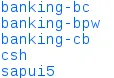
Three banking-* folders must exist.