

Nested virtualization 🔗 allows to run a hypervisor inside a VM. You have a VM running in Proxmox, and that VM is running another VM. The guest VM is the host for another guest VM: Host -> VM => runs another VM. The Proxmox Wiki contains some more information about the topic and how to configure Proxmox to support that scenario.
By default, support is not enabled. Trying to run a VM inside a VM will fail. Below screenshot shows an example of such an error message (taken while trying to run CRC).
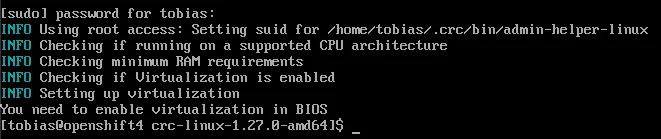
Activate virtualization on host
Check if nested virtualization is enabled on the Proxmox server. Actual command differs on your CPU vendor. For Intel (I have a NUC, therefore Intel CPU):
cat /sys/module/kvm_intel/parameters/nested

Activate the parameter:
echo "options kvm-intel nested=Y" > /etc/modprobe.d/kvm-intel.conf
This will create the file kvm-intel.conf and set the parameter. Reload the kernel module to activate the change.
modprobe -r kvm_intel
modprobe kvm_intel
Check if KVM is active.
cat /sys/module/kvm_intel/parameters/nested

Activate virtualization on guest
After activating the CPU feature in the host, Proxmox supports nested virtualization. For a guest to be able to host a VM, the guest VM must be configured to use the CPU feature. Change the CPU type of the VM to host. This can be done via cli or via the web interface.
cli
qm set 104 --cpu host
The number (104) is the number of the guest VM in Proxmox.
web
The CPU setting can be changed using the web UI. Go to the hardware settings of the VM and edit them.
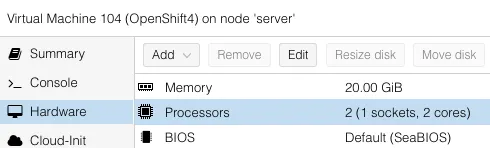

The type setting needs to be changed to host.
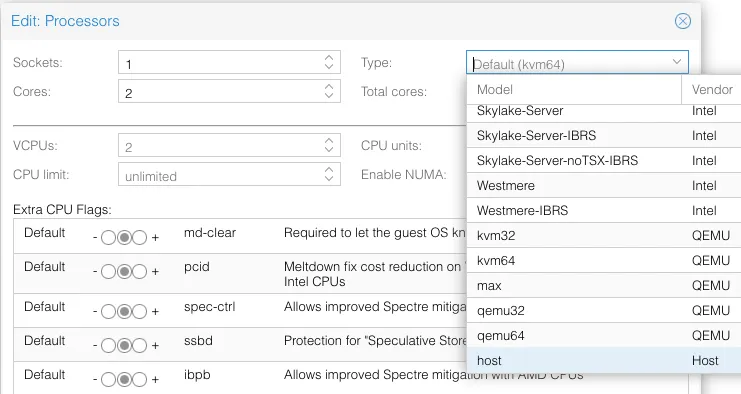

Result
Now both Proxmox and the VM support nested virtualization. When a new VM is created in Proxmox that is intended to run another VIM, ensure that the CPU property is set.