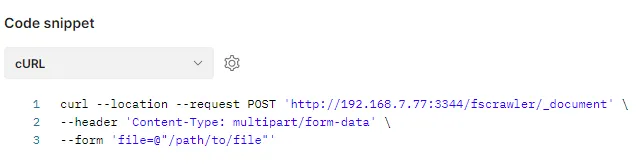
I had to use Postman to upload a file to the FSCrawler 🔗 REST service. The rest service is running under the following URL: http://192.168.7.77:3344/fscrawler/_document 🔗. The FSCrawler docs 🔗 explain how to use the command for curl. The only challenge was to translate the given information into the Postman UI.
curl -F "file=@test.txt" http://127.0.0.1:8080/fscrawler/_upload
The parameter -F means that the file is send via form. This is explained in detail in the curl manpage.
“For HTTP protocol family, this lets curl emulate a filled-in form in which a user has pressed the submit button. This causes curl to POST data using the Content-Type multipart/form-data according to RFC 2388 🔗.”
For Postman this means:
- POST request
- Header for Content-Type is multipart/form-data
- Provide binary file as file parameter
Postman
Request
POST http://192.168.7.77:3344/fscrawler/_document 🔗
The doc says _upload, but in my ElasticSearch version 7.17.1 I get told by ES that _upload is deprecated and that _document should be used. As the FSCrawler REST service is “just” a proxy for ES requests, it is possible to change the URL and use _document.

Header

Body
Type: form-data
Key: file
Attention: also select from dropdown: File
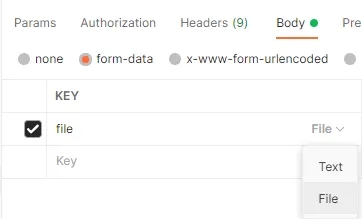
With File selected, a file selector appears und value,

In the file selection dialog that is shown any file can be selected and added to the request.

Result
Nothing else is needed to send a single file. The code snippet for curl reveals that the request matches the FSCrawler documentation.