

There are two flavors for the ABAP Development Tools 🔗 available: ABAP Workbench and ADT for Eclipse 🔗. This will change. ABAP developers will be able to use VS Code for developing ABAP code. At TechEd 2025 in Berlin the new ADT for VS Code was announced. The official announcement was accompanied by blog post detailing the reasons, architecture and what to expect:
- ABAP Development Tools for VS Code: Everything You Need to Know 🔗
- Behind the Design: How We Transformed the ABAP Development Tools Architecture to Support More IDEs 🔗
One post mention that demand for ABAP development tools in VS Code was demanded in 2023 and 2025. Of course, the demand was raised loud and clear years before 2023. And for years, SAP gave a terse reply: No. And stop asking.
Until now.
Finally, finally, finally, finally, finally
This was a long overdue announcement. The SAP developer community was united globally in saying not only thank you. You could practically feel everyone exclaiming, “Finally!” Yes, finally the SAP full stack developer can stay in one IDE when developing a modern SAP application: from data definition, tables, to RAP: be it ABAP in the backend, Fiori Elements apps in the frontend, no need to switch IDE. Maybe this will bring an end to the unworthy tool bridge 🔗 to connect SAP Build with ADT Eclipse.
Offering the option to develop in an efficient way is not optional. A vendor must stay attractive to developers and offer support for their programming language where the developers are. While SAP continuously stated that Eclipse is their state-of-the-art IDE for ABAP development, the number of developers that associate Eclipse with state-of-the-art is rather limited. Yes, this was not always the case, yet developers moved on. Since several years 🔗, the go-to IDE is VS Code 🔗. The IDE for which other teams from SAP 🔗 offered early on their extensions. The Fiori tooling 🔗 might be the most prominent one. And now, finally, the ABAP development tools team.
As a side effect, life for SAP developers will get easier. Again: finally, after years of asking, waiting, and being rejected. One IDE to develop an app. One IDE for the SAP full stack developer.
Not now, not soon, but soon enough
Release is scheduled for Q2/2026. At earliest this is in April 2026, at worst End of June 2026. TechEd was at the beginning of November. Adding the 2 months until 2026 starts and you can do the math: this sums up to 6 to 8 more months. Well, we had to wait for ages, so no complaining. On the other hand, we can expect a release that is no alpha, beta, pre-alpha-something. Not only did SAP have ages to plan for ADT for VS Code. The underlying technology is the one from ADT for Eclipse. As the blog posts explain, one super important part is the language server. The part that is doing the heavy lifting can be reused from ADT for Eclipse. The same for the UI. Only two editors are needed. With this, most tasks are outsourced to the ABAP backend. Basically, this means that SAP can focus on the details.
Making ADT for VS Code available and everything is OK? Life isn’t so easy and especially regarding the SAP developer reality. Some things need to be looked after to ensure that ADT for VS Code is going to be a success.
More IDE support
The necessary extension to enable ABAP development will not be released only to the proprietary VS Code marketplace. SAP stated those will also be published as VSXI. As long as the IDE supports VSXI: the ABAP extensions can be used. This includes a wide range of AI focused IDEs based on VS Code like Cursor 🔗. Fun fact: this should allow you 🔗 to bring the ABAP coding capability to Eclipse Theia 🔗.
With such a wide range of possible IDEs: What about support? Are all IDEs equally supported? Or are the VSXI alternatives getting a lower priority? Will the extension be released for all at the same time? Or is the first release going to VS Code and the others only after a few days or weeks? When I run into a problem in IDE XYZ, is the answer going to be: can you try this out in VS Code and see if it works there?
What is even more important: what happens when developers move on and away from VS Code? How to ensure that in the scenario of VS Code is the new Eclipse, the ABAP development tools will be offered to whatever IDE is then the preferred IDE by developers? How to ensure we do not have to wait another half-decade? I hope that SAP learned from their ABAP IDE experience and offer a good roadmap influence process. By defining and following some hard requirements it should be possible to ensure that the SAP developers are never ever going to face the IDE problem. Why should these requirements be public? History shows that letting SAP alone decide which IDEs to support is better not handed over entirely to SAP. And having requirements publicly defined makes it hard to kill any request with: no, not planned.
For what other IDEs should SAP offer ADT? Won’t Eclipse and VS Code be enough? Maybe, but you never know what the developers out there are using. There is Visual Studio 🔗. NetBeans 🔗. IntelliJ IDEA 🔗 maybe. SAP could even release an SAP flavor of IntelliJ, like Google does for Android development. Those are just the ones that are already widely available and adopted by developers and companies. Who knows how this will be in e.g. 5 years? An open, defined process to decide the next supported IDE will make it possible to develop always on at least one modern IDE.
I’d suggest having a yearly (at least) survey. When X people participate, and Y vote to support a new IDE, SAP has Z days (like 6 months) to offer the ABAP tools. Of course, the IDE still needs to match some requirements too, like X downloads/users/years old, be relevant, etc. Personally, I’d like to see ADT support for vim or Emacs, but those can easily be marked as not relevant.
Special challenge: offer ADT for Xcode 🔗. There are enough ABAP developers out there that work with a Mac. And aren’t there Sapphire events when SAP and Apple showed their love for each other?
Eclipse developer experience on VS Code
One of the usage scenarios that convinces ABAP developers to switch over to ADT in Eclipse is the ability having several SAP Gui screens open in tabs. Run a report: new tab, new SAP screen. Run a function module: SAP Gui opens in a new tab. Of course, this is a must have feature for VS Code too. As BAS is using VS Code too, ADT will be brought to BAS. And with it, there must be support of SAP Gui. Don’t know how this will work, but let’s let SAP solve the technical details. Yeah, current focus for ADT for VS Code is on RAP, not reports or anything that might need that the developer runs a transaction. But to take this seriously, sooner or later ADT for VS Code must support running reports and function modules/groups via SAP Gui. Marking this as out of scope is not acceptable. However, I guess for web-based environments this will never be offered. For local installations, it is a must. Local means here also for all major OS: Windows and Mac. Maybe also Linux, but I think this is rather unrealistic. But I cannot wait to see a good offering of ADT for VS Code running on Mac with a decent SAP Gui integration.
Another ADT for Eclipse developer experience is the virtual workspace. The ABAP files stay on the ABAP server side. Unfortunately, this behavior is the main reason why developing ABAP apps with Eclipse lacks adoption. While Eclipse usage is forced when writing modern ABAP applications like RAP or even CDS table|entity|views, it is far, far away from enabling modern development. It does not matter if a developer is using SAP Gui or Eclipse for ABAP development: the same development principles are applied. This always made it hard to convince developers to move to Eclipse. Specially when they “only” must work with reports. In such cases, ADT for Eclipse does not add substantial value to the developer experience.
Enabling SAP developers to be modern developers is more than just providing an IDE. When you look at the non-ABAP, or even non-SAP developer experience, it is obvious what is missing. Writing code is just one task in the overall development process. The possibilities available in other languages and ecosystems are a reason why companies adopted a modern development process. To ensure that ADT for VS Code gets adopted it must support what companies are used to when working with VS Code. If this is not assigned as the highest priority, ADT for VS Code will only compete for the developers already using ADT for Eclipse and not be able to bring all the SAP Gui developers over to VS Code. It will also not convince companies of the value ABAP development with VS Code can offer. Currently the plan from SAP seems to just bring the Eclipse experience to VS Code. And here, we, be it developer, testers, architects, everyone that touches ABAP code in a company are tasked to ensure that the possibilities VS Code offers are fostered.
Strange new world for ABAP Developers
Just offering the same developer experience that is offered on Eclipse to VS Code is not enough. ADT Eclipse is available for over 13 years 🔗 and still not everyone is using it. There are reasons why developers do not switch. With ADT for VS Code, maybe some of those can be solved and bring more developers from SE80 to VS Code. How? VS Code opens the door to a whole new world. Development is done differently in VS Code.
git
VS Code comes with a developing approach that can change how ABAP applications are developed. VS Code is made to work with files. Best: files locally on your computer. Bad news: SAP does not want this. ADT for VS Code will offer a virtual workspace. With this, the ABAP files will stay on the ABAP server. Better, or should I say: mandatory! is to bring the files to the laptop. ADT for VS Code must offer an option to sync all files you work with to your computer. Or all files in your package. Or all files of a package of your choice. With this: say hello to git support. When the ABAP files are available on your computer, you can add them to a git repository. No abapGit needed to get those to your corporate git repository. The normal git-based workflow you have today when using VS Code must be supported by ADT. Instead of starting the git flow in the backend, you start it in your IDE.
Scaffolding
With local files, the development process does not need to start at the backend. It can start on the developer’s side. The file-based approach makes it easy to bootstrap projects. Why not offer a yo generator for ABAP? There are RAP generators already available 🔗 for ADT or backend. Why not offer something similar on the cli? A yo generator for RAP, for classes, unit tests, extend a service … This is how currently Fiori apps development starts, so why not offer the same level of convenience? Combining the ABAP yo generators with the Fiori or CDS ones: win:win:win.
ABAP Doc
A tool that parses the ABAP files, takes the ABAP Doc comments 🔗 and writes them as a HTML file: That ABAP documentation can be hosted as a web site in the git repository. Diagrams can be added in markdown files and stored next to the ABAP files. They might not be stored in the ABAP server, but in git.
Linting
An ABAP linter can be added to discover errors. Any forbidden statements? Any unused variables? It is all in the files. Run a linter over it, store the result, analyze it. With local files, this can be done before copying the files to the ABAP server.
Testing
It would be nice to be able to run ABAP unit tests from ADT. Using e.g. a script like npm run tests. The unit tests are run in the backend, the result is saved on the fronted: lcov 🔗 or Cobertura XML 🔗. Running the unit tests via script, capture the result: this can bring CI with ABAP to a new level.
Integration
Having the files in an accessible central server allows to use the same development best practices others use. Feature branches, create a branch directly from a e.g. Jira issue. Code quality metrics like code coverage or unit tests metrics can be captured and displayed where the corporate development happens. It should be possible to define dependencies and when a new backend RAP service is ready, then the necessary frontend CI tasks can be triggered.
CI
The same as starting tests via script, deploying the ABAP coding and activating it via script would be nice. When VS Code can copy the ABAP files to the server and activate them, why should this not be possible via script? A simple npm abap deploy or npm abap code-coverage unit-test atc. An SAP developer can push the ABAP code to the corporate git server, the pipeline starts, code might be copies or activated, unit tests are run, ATC, results are captured. The results are then shown in the very same tool all the other coding is managed.
Clean Code
One benefit that should not be underestimated when adopting a file based, file first development process: clean code. Currently, given by the SAP Gui defined ABAP development process, the dev system is also the source code management, the (unit) test and everything developer related supporting system. Because of this, the dev systems are mostly a mess. There is so much stuff in there, people are afraid of setting up a clean dev system occasionally. Everything you want to try out gets first added to the system, activated, and maybe will stay in the system forever. A side effect of this is that putting transports together can be a challenge. The first step in any clean code or clean core strategy is to only let clean code enter your system. A QA check could be to pass first the linter, then ABAP Doc must be provided, unit tests be available. When a pipeline is used to run QA checks before the code gets copied to the ABAP server, and when the results show that the quality goal is not met and the code is reversed, then the dev system will become clean. That this is possible we know thanks to abapGit.
Dev Containers
VS Code works nicely with dev containers. This can help easing the pain when working with extensions or eliminating the problem of “works on my machine” because several years ago some hidden flag was set in some obscure config file. Or doesn’t work because of this.
Develop everywhere
In case SAP does ADT for VS Code right, you can develop everywhere 🔗. Go to a GitHub or GitLab repo and press “.” on your keyboard. Yes: happy coding. No installation of an IDE necessary.

SAP only must ensure that their extensions also work in the Web IDE. Something that currently is not working for all extensions.
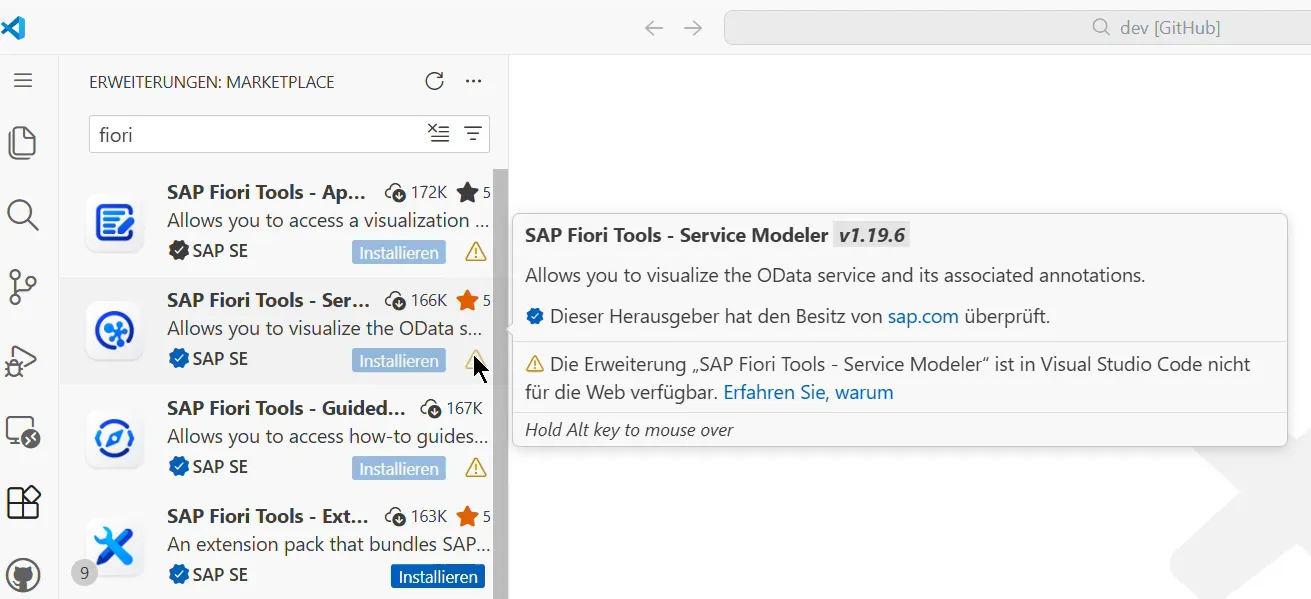
Is this an impossible task? No, of course not. Guess who is proving VS Code extensions for ABAP developers that can also be installed in the GitHub Web IDE?

In case you ever had the fun of working with Eclipse inside Citrix: it won’t get better with VS Code. Offering the developer the same VS Code experience in the web, directly from where the source code is stored – GitHub, GitLab – is a must have feature. This will convince companies to invest in their ABAP developers to adopt VS Code.
Bundle
One big, big problem with ADT for Eclipse was (is) the missing all-in-one bundle. If you ever had to set up your ADT Eclipse on Mac (additional challenge: SNC): this is not how it should be. And for Windows: better, but why do you have to download Eclipse and add the necessary ADT plugin? I cannot imagine how many hours the average ABAP developer using ADT in Eclipse had to invest to only be able to have a working IDE. And if you take this and look at how many ABAP developers at a company have gone through this and then consider how many are there worldwide. That’s a lot of effort spent to just be able to code. If you think that number so far is high: remember: developers have been going through this for 13 years. Let’s hope SAP offers something that is company friendly (aka works in Citrix with no internet access).
AI
The hidden gem having VS Code as IDE: this gives the possibility to use a wide range of AI coding tools. Not just an AI IDE. You can plug-in GitHub Copilot to VS Code and start using Copilot to help you code ABAP. Or any other AI/LLM that you can connect to VS Code. Cloud, local, corporate: it is up to you. No need to wait for someone to offer an add-on for Eclipse. With VS Code, SAP Joule is only one option from many. If the market works, this should ensure that developers win. The suddenly available competition should ensure that SAP needs to improve constantly their AI for ABAP and Fiori, and the competition must do the same to stay relevant in the SAP market.
AI development process
Using AI for development is becoming a commodity. With this change, a feature adopted years ago outside ABAP development is a driver: branches and merge/pull requests. In a feature branch new coding is added by a developer and after a push, AI is taking over: code is optimized, unit tests are written, executed, and maybe even missing coding is added. And the developer is deciding if the result produced by the AI is good enough to be merged. Combine this with the many other tools available only “good” code is entering the system.
Change in mind
Most of the possibilities shown above are part of the developer tasks when developing a modern application in VS Code. And it is not the most complex or rarely used features. These are rather the basics. They are, however, almost impossible for ABAP developers when they want to apply modern development principles. Maybe with the move to open ABAP development to other IDEs we might see a change in mind coming to SAP in the next year(s)?
The challenge now is to make the most out of ADT in VS Code. Unfortunately, the currently communicated plans look like we will get the Eclipse development experience in VS Code. Short:
- Modern ABAP app development in VS Code: Yes.
- Modern development with ADT VS Code? No.
Is this enough to convince the developers to finally ditch SAP Gui for development? It doesn’t look like they will get any benefit from VS Code that Eclipse does not already offer. So why switch? Why did they not already switched to Eclipse? It is more likely that developers using Eclipse will switch to VS Code. For companies to drive adoption VS Code must offer some benefits. Not having coding guidelines, tools, processes and then having the exception from the norm for ABAP coding is a benefit. For everyone developing Fiori apps with ABAP the adoption to VS Code should be a no brainer. A few things may come ootb with the release of the VSXI extensions. The ABAP community already showed that they know what a modern development process looks like. Now we also have a modern IDE. Let’s keep fingers crossed that it won’t stop here.
A game changer regarding ABAP development might be when the SAP teams are open to go beyond “just” providing ADT to another IDE. When they are open to change the development experience, the possibilities for ABAP developers almost endless.