

I fail too often too early
Part of the job of an architect is to evaluate solutions and products. Luckily, not necessary to know everything and every detail. It is rather about finding out if and how something can be used by the company. What is needed to get it running, to operate and how to roll it out to users. On a higher level enterprise architect might look at the capabilities and how these can support a business process. But here the work does not stop. Or rarely starts as most tasks for architects are about enabling. While the high level view is essential, more important is to find out how to connect the dots. Architects often evaluate products for technical roles, mostly for developers. Specially here the expectations from a company perspective are to ensure that developers can focus on the product enhancement tasks. After all, and specially in the SAP universe: standard software does not cover all company specifiy requirements. The standard must be adopted; enhanced with custom software. Buying the license can be expensive, operating it too, and a cost factor that companies want to see elminated is developers struggling to get ready to work.
Enabling developers means to provide the tools needed. This is not only to provide access to an IDE. Solutions get more complicated, so does the developer environment. But: all that is needed must work. Not just for only for one developer, but for all. The larger the company or the more complex the landscape, the easier it must be. A developer should not spend hours, days, or even weeks setting up the environment, reading pages of documentation, or fiddling with parameters just to be able to develop. Everyone should have the same starting point when the development starts. While developers can and will adjust later on their environment, the foundation must work and there must always be a common understanding about how the foundation works.
Imagine having to onboard developers from around the world, from on-site or online locations, with different equipment like laptop or Citrix or with or without VPN. 1:1 enboarding is not possible. An onboarding document that outlines the base steps should be a simple document. You want to point them to an IDE and maybe half a page of documentation on how to log in. Several tasks need to work out of the box, feel as one product even when they are not. Tools must work, best be self expaining and put the focus on developer enablement. It must work as: start the tool, let the wizard create an app, here is the help, add this for testing, do a commit of your work, deploy/activate it like this. This must work for everyone.
Expectations
The expectation when opting for one vendor like SAP is: one experience. An SAP developer gets the tools and help needed to perform a task. At best, the experience is: I work with SAP. Everything behind that touch point is first and foremost hidden.
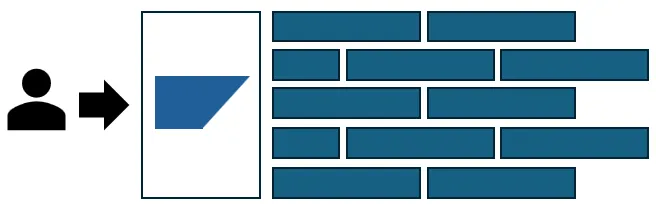
If wanted, the complexity can be unveiled. But for the average task, it just does not exist. The average developer gets access to ADT in Eclipse, abapGit is available and configured to work with GitLab or GitHub, ATC works and the switch to BAS/VS Code is just a click. The (Web)Dynpro experience tells us one thing: never ever underestimate the productivity a developer gains from an integrated developer experience.
Luckily, tools change over time. This change is sometimes needed to ensure the best experience for everyone. Companies and their employees want to benefit from some of the latest innovations. Developers want those too, or demand them to not be outdated. With this change comes the task to integrate those tools. The expectation is very low. The tool must work, not cause errors and support the developer. On top, company requirements must be met like integration into the current tool landscape and follow the governance or security rules. Therefore, evaluting tools for their enterprise readiness is an ongoing task. From the company side, the task is to take the tools recommended by the vendor, put them together, maybe add another tool or plugin, and make them available.
Short: there is not much expected from the tools: just work. Be useful. Increase productivity.
Failing, again and again
It should be easy, but getting a working, stable toolbox with SAP tools is a challenge. A detailed description of me failing can be found below. Evaluting tools with the goal of finding out if and how they can be included in the developer toolbox is a taks where I fail too often, and too early. Some anectodes from the last years.
- Installing the MDK SDK proved to be more complex than it should be 🔗.
- The UI5 linter 🔗 (presented at UI5con 🔗) and I tried it out with a newly created UI5 project using a wizard (yo generator): the project violating best practices.
- TypeScript for UI5 support was announced for newer UI5 releases. It took a while for SAP wizards to use TypeScript.
- The Fiori app wizard tool generates a Fiori project with TypeScript. The test files are written in JavaScript.
- Up-to-date dependencies. You can read more about this in my post Update your dependencies 🔗.
- SAP Gui Java. SAP Gui Java is strict when it comes to XML validation and logon to SNC secured systems. Manually install libraries, SSO configuration or use the SSO solution (beware: licensing questions).
- ADT installation was/is a task too technical. DSAG published a guideline 🔗 for a task that should be a non-event.
- ADT for Mac users. JavaFX was required: find the library and add it to ADT.
- General ADT and SAP Gui Java: learning the nitty gritty details of SAP Gui configuration and eclipse.ini is not what makes it easy to roll this out.
- MCP servers
- Publish a RAP OData v4 service (customer influence request).
- Edit a RAP based Fiori Elements application
- Use Joule for ABAP developers
- …
This is just a small list of cases where I stumbled across a problem very early on. It is not like I was able to deep dive into a tool and found some strange bug after working with it for months. In ADT all I wanted was to publish a dummy OData v4 service and it did not work (I think this was in 2021? up to 2023 when this was seen as a problem that should be solved by SAP). Other examples simply mean that before I can even start looking at the tooling and what it provides, I have to fix security or best practice issues.
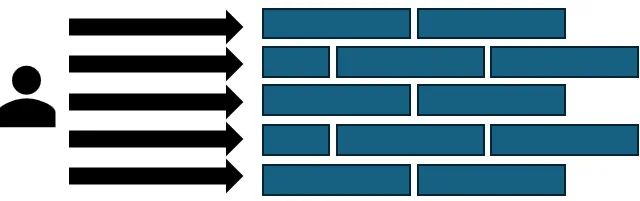
My constant failing can be attributed to that the individual tools are individual tools. Instead of being seen as one piece contributing to the bigger SAP picture, the tools are developed and made available by SAP invidually, by individuals. There is no one acting as an SAP representative between a developer/customer and the tools. There is no SAP developer organization that is the single point of contact. That is responsible for providing the tools and their flawless usage. There are, however, teams for UI5, Fiori, ADT, BAS, Build Code, ABAP, CAP, JavaScipt, TypeScript, CSS, Theme Designer, PO, CPI, Mobile, Fiori UX, Fiori Launchpad, Workzone, BTP service A to Z and so on. All those tools you need to work with to deliver a modern SAP application: you will - and yes, this can be pronounced like a threat - you WILL get to know all the tools, all the teams, and many, many SAP employees personally.
While this setup could work, it is not. The tools are far from perfect. That’s OK and is rooted in the nature of development tools. They are never perfect, nor finished. There will always be edge cases where they are not performing. But in the case of SAP it is not just that some obscure parameter is missing. The principle that these tools have to fulfill enterprise requirements, to be enterprise ready, is too often seen as optional. Not only do the tools not work out of the box, they are not working together to achieve the most important objective they serve: enable developers. SAP developers.
It seems that SAP is surprised that people are using their software not voluntarily.
It should not surprise anyone, but the people/developers working with SAP do so because they have to. Their employer opted to use SAP, so they have to use the tools provided by SAP. Even for the open source software from SAP: the cases where these are used by someone not linked somehow to SAP is the exception. Even pure open source projects using OSS from SAP are rarely not from someone that is not working with SAP professionally.
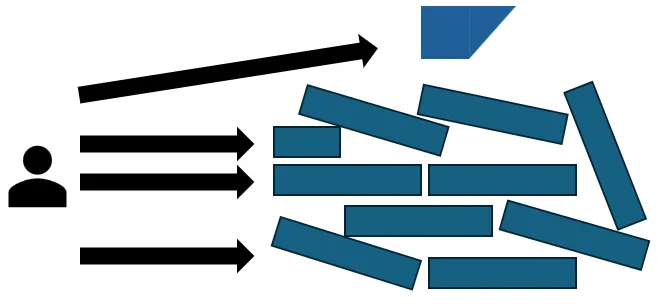
All needed is a working toolkit for developers. What you get it: work. It should be as in the first image, not as in the image above. Surprisingly, SAP decided to deliver the situation as shown above. And there is not much hope that this will change.
Why?
Why won’t this change? Several years ago SAP decided to adopt - or maybe: promote - design thinking. One nice thing about this approach is personas. You try to find out who is going to use your softare and what their expectations are. Unfortunately, it seems that there is no customer developer persona at SAP. Some might say, there is not even a customer persona, but for this article I’ll focus on the developer role. The personas SAP uses seems to be: works on my computer.
It is good to know that someone was able to get the software running and do something with it. This piece of information just does not help when a wizard includes libraries that are marked as a security risk. It does not help when - in the case of SAPGui Java - you cannot even log on to your SAP system as it secured by SNC. That approach is recommended, but you’ll need SAPGui for Windows. Or demand that people are using Citrix. If your solution to a problem is recommending to use Citrix, you do not have a solution. You do have one more problem.
As stated above, you will get to know some teams personally. You’ll spend time opening tickets, customer influence requests, meetings, emails, etc. Again: not for some strange edge case 15 level deep down in some obscure file that only you and the developer have ever seen. The taks is still to get the tools working as advertised. While for some of the cases listed aboce a solution is now available, the question is: why are the blockers there in the first place? Why are they not fixed with highest priority before making the tools available? Why is there no customer focused, pro-activley mindset that makes SAP teams solve these problems without adding additional work to customers? I want to work with the tools, not give SAP a step-by-step guide on how to fix their tooling. And when I do so, the expectation is that this is forwarded to whoever is responsible. I might be lost on whether this is a caused by tool A or B, if this can be reported via GH issue, via service ticket, CEI or something else. The 1st level games from SAP where a bug is reported, but, god forbid!, to the wrong team or ticket and therefore ignored, because: how dare you customer to not open a ticket in the correct category, assigned to the correct team. This game is tiring. The chance that the person reporting something is working for a paying customer, is working with the tool because it is part of the job, is as close to 100% as it can get. SAP is a company that sells products. This means that everyone at SAP is working in sales, and in customer support. I can already hear people stating: some of those tools are open source, your turn, this is how open source works. Behind those open source tools from SAP you have SAP. Those tools are promoted by SAP. And when SAP is promoting the usage of their open source tools, maintained by SAP employees, shown at SAP events by SAP employees, tools mentioned in SAP documentation, it is more than fair to get a piece of software that does not fail very early on. Regarding bugs showing up later when doing some crazy stuff: OK, let’s open a ticket. For findings that happen during setup? Your turn SAP.
Experiences in detail
Most examples here are from end of Januar 2026.
UI5 wizard fails as optional value is missing
Using the yo generator and easy-ui5 (version 3.9.1) and not entering an author name causes the wizard to fail.
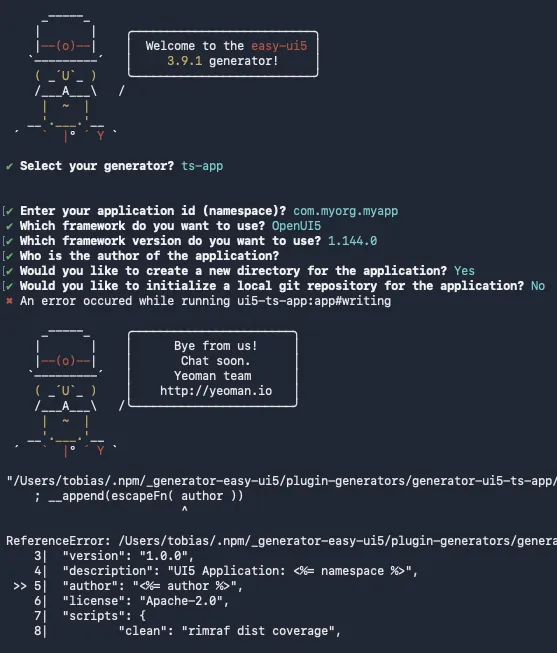
The used version 3.9.1 is from December 29, 2025. Not so old. The error should be easy to fix. But why is the author optional when the wizard fails when no value is provided? Seems like this was not tested. Looking at the issues on GitHub: the last ones are from 2024. Maybe I am just using an outdated tool?
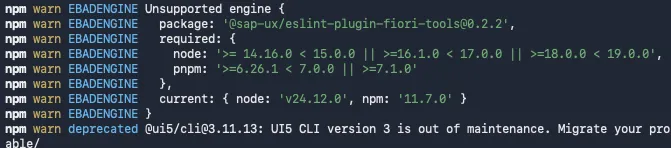
Unsupported engine
I ran the ui5 generator for project and was informed that my node version is outdated. My version is node v24, which is a LTS release. This project template is doing some time traveling, as the versions demanded - 14 to 19 - are EOL 🔗. Maybe a hint that this template is deprecated and should not be used could help?
Vulnerability
Running the UI5 generator (easy ui5) and let it generate an app: it prints out some messages that mean in a certain security adhere environments: please explain yourself. I do not know if the packages causing these warnings are critical for the app or not. But when the installation already states: do not use it or not supported: this is a problem.

Of course, npm fun does not stop here as the output shows 6 vulnerabilities, of which 4 are ranked high.

npm audit fix can help, but … it suggests to install @ui5/cli version 1.14.0. That release is 6 years old and deprecated.
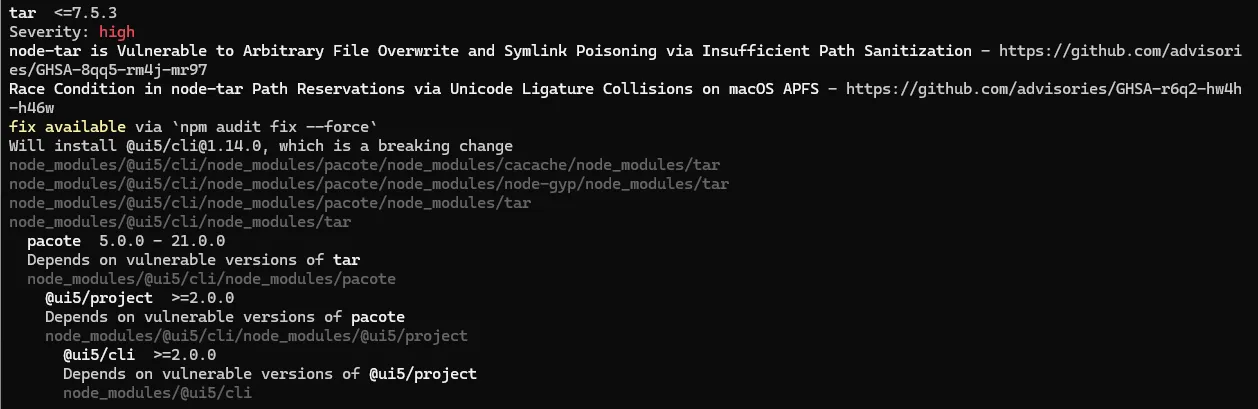
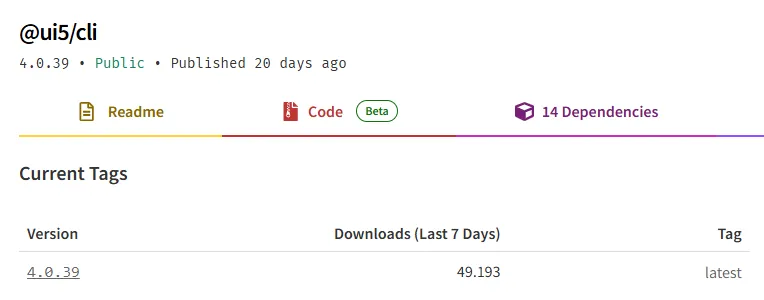
My current ui5 cli version is 4.0.38. At the time of me writing this, 4.0.39 is the latest @ui5/cli version 🔗.
I am not here to discuss npm. If 1.14 is the version I have to go to to solve a security issue, then be it.

Congratulation, I now have 86 vulnerabilities. 41 high, and also 12 critical.

But I can run npm audit fix to solve the issue. Guess what is happening when running npm audit fix —force again? @ui5/cli gets updated to 4.0.39.

You cannot make things like this up.
Mybe I am the only one that ran into this problem? A good indication can be the download statistics from npm. Assuming that other people also try to solve vulnerability problems using npm audit fix, who else downloaded version 1.14.0? The latest version was downloaded +/- 50.000 times the last 7 days. In case you wonder how many times the old, outdated, deprecated ui5 cli version 1.14.0 was downloaded the last 7 days. No, it is not 0. It was 3.604 times. Even the even older version 1.13.0 is downloaded 2.758 times.

My understanding here is: over 3.000 times it was tried to solve the vulnerabilities by running npm audit fix. And over 3.000 times people were downgrading UI5 cli to 1.14.0 … or even 1.13.0. Now: I hope someone from SAP looking at this. I refuse to believe that one is wondering why in 2026 a 6 year old UI5 cli version is downloaded over 3.000 times. Adding the downloads for 1.13.0, it is way over 6.000 downloads. That is close to 12% of the total download numbers of the latest version. Ok, I understand, 99% here is npm to blame. But maybe it is somehow possible to have a newly generated ui5 project from a yo wizard that does not include security issues? There must be a way, somehow. If these security issues come from optional components, maybe give the option for a slim, down to the basics, UI5 project?
UI5 linter
Running the ui5 linter over the above newly created UI5 project … and I am already not following the UI5 best practice recommendations.
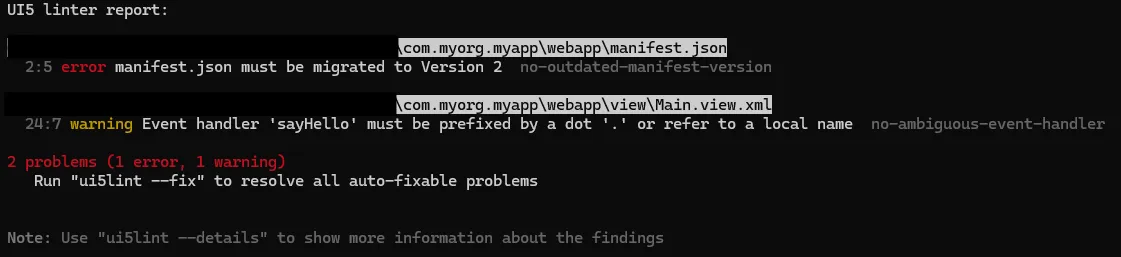
I think / believe / hope / fear that the app generated by the wizard is based on this template 🔗? At least here the manifest.json 🔗 is using _version 1.12.0. Generating a new ui5 project using ts-app 🔗: ui5 linter complains about version 2. Same error: _version in manifest.json is set to 1.21.0 🔗. Looking at the UI5 documentation 🔗, the version goes up to 1.82.0 / 2.4.0? What happened? Am I using the wrong template? And why should I care about this?
The one that gets the most benefit out of these templates is not the developer. It is the UI5 project as it makes onboarding easy helps building a community of developers. Therefore, can somone from the SAP UI5 team clean up the templates?
In theory, switching to UI5 2.0 is a non-event when you follow best practices. The UI5 linter is something like the final boss for UI5/Fiori wizards. I created a new, fresh, Fiori App using the Fiori Tools Application Generation Wizard. The backend: an OData v4 service.
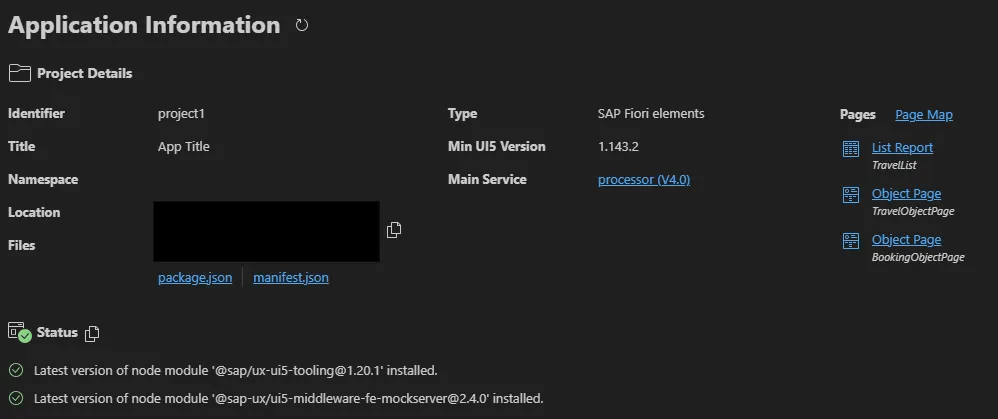
Directly after the project was created I ran the UI5 linter.
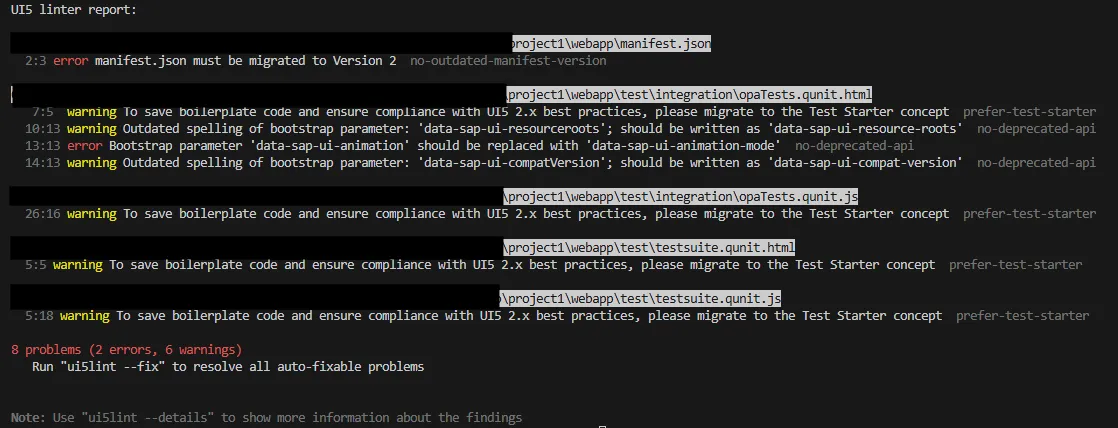
2 errors for a newly created project? I want to start development, not fixing errors caused by the wizard. The wizard should make my life easier.
Optional and for UI5 2.0
The UI5 linter is not a linter per se that warns you about syntax errors. It is intended to help you to get your UI5 project alinged with UI5 best practices so the adoption of UI5 2.0 is as easy as possible. But when the wizards recommended by SAP for UI5 and Fiori development already are not following the UI5 best practices, why should I?
Update dependencies
As you can see from my article 🔗 an old and abandonded component made FIori projects stuck with an outdated version of ESLint. Problem is now solved. But why did this happen in the first place? I doubt that no one at SAP that develops a Fiori app was unaware of this. Again, the problem was easy to identify. It is simplem, yet causes major problems: a new application used outdated software. This is enough for some environments to not allow this app to go live without going through an additional approval process.
Test files in JavaScript
A Fiori project generated via the Application Generation Wizard now supports TypeScript. Partially. The tests included in the template are written in JavaScript.
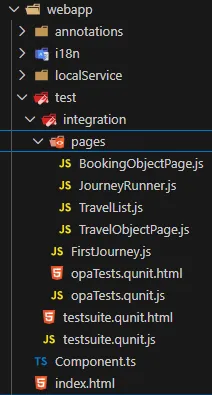
Looking at the UI5 TypeScript documentation QUnit 🔗 OPA 🔗: seems that having the tests in TypeScript is possible. In case your goal is to have only TypeScript in your project: manual work or wait until the template is adjusted.
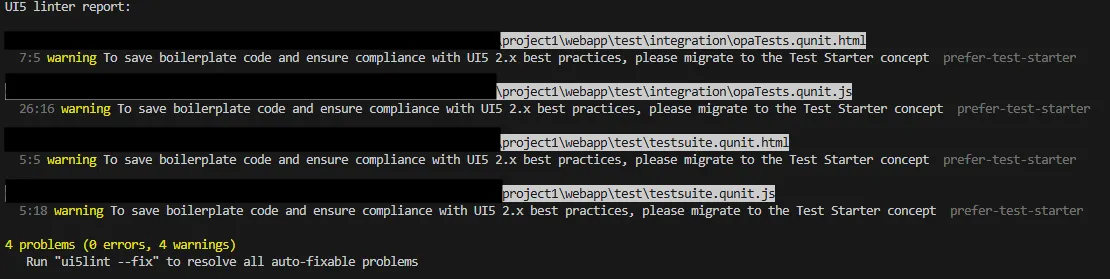
The ui5linter hints that the tests should use the Test Starter Concept. OK, nice, I assume when the linter states this, it is a good idea to use it. When is the wizard going to generate a project using the test starter concept?
MCP Servers
My experience with the UI5 MCP server is documented on LinkedIn 🔗. Updating the UI5 version ended in manual work as the AI and MCP Server had problems with the UI5 and types version. Happens, yet, the announcement and the repo are not giving the impression that the MCP Server is not production ready.
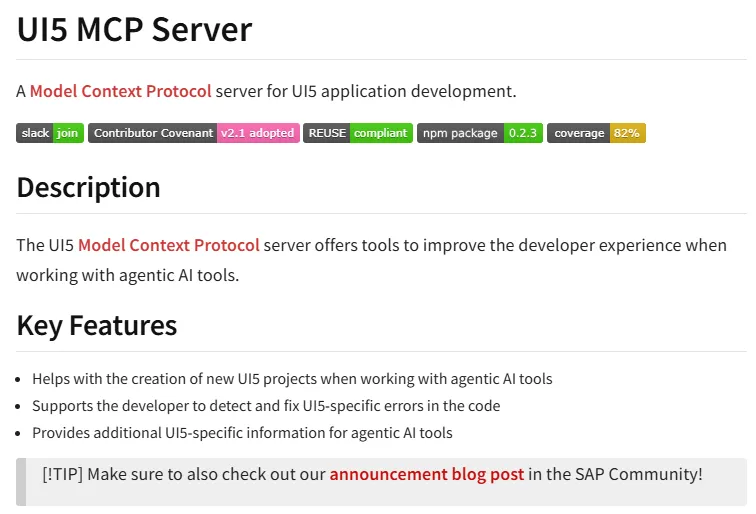
The announcemnt 🔗 encourages the usage of the MCP server: “The UI5 MCP server works well for everyday tasks in UI5 projects.”
I am not writing about my Fiori MCP server experience npm 🔗 | GitHub 🔗 as it comes with a very clear warning: experimental and it might break things.

What confuses me now is that the Fiori MCP server that is marked as experimental is at version 0.6.10 🔗 while the UI5 MCP Server that is announced as ready for everyday tasks is at version 0.2.3 🔗.
ADT
ADT is so easy that there is a handbook available explaining how to install and use it. And this does not help much, as installing is a manual task, yet, there is not all-in-one downloader from SAP available. You can use mine ADT bundle builder 🔗, but this will only give you an Eclipse + ADT and plugins. You won’t get e.g. SAPGui with it, nor any additional libraries if needed (SAPGui Java). Or anything else like being able to connect to an SNC secured system via SAPGui Java.