

LLMs are great when trained with the right data. You have a question and instead of reading through thousand of pages, the AI answers. This works as the AI’s LLM model was trained with all those thousand of pages already. The problem with this is: the LLM needs be trained. In case the training data did not include what you want to know, or was only partially trained as material is missing, the answers given by the AI are close to useless. Training an LLM takes time. While LLMs are continously trained, they are only released after some time. Everything new that happened between the release of the LLM and now, the LLM does not know. If the question is about something new, how should the LLM know this? One solution is use a LLM that consults data from the internet. You get up-to-date information, but not necessarily tailored to your specific need.
Retrieval-augmented generation
A solution to this problem is Retrieval-augmented generation (RAG) 🔗. RAG allows you to insert custom information to your LLM. This information can be company information like functional specifications, developer guidelines or documentation. And it can be anything from the internet, including documentation for a specific version of a software you are using. While the company use case can get somehwat complicated, RAG also works nicely for personal usage.
The problem RAG solves is to get access to the information you need, tailored to your specific use case, instead of general and generic access to information. If you want to know how to develop a piece of software, and you only have a given release available, you want that the AI gives you code and information that works with your release. In the context of e.g. SAP, when you have access to a NetWeaver System 7.50, any information on how to develop a RAP app is useless. When you want to know how to develope a modern SAP application and your available tech stack is S/4HANA 2025, any information on how to create a report with Dynpro might also not what you want.
Information retrieval
How do you get the needed information into your AI? The internet is full of information that can be accessed via a web browser. This can be source code hosted on GitHub or GitLab. You can find other resources like PDFs or presentations. And then there are websites. Websites can be complicated. First you need to know the URLs. And then you need to be able to access the information.
Link retrieval
Compiling a list of links can be done manually. You save the URLs that interest and provide them later to your LLM as training data. This gives you automatically a list of curated URLs. Only resources you accessed and validated are added to your knowledge nexus. This works nicely for e.g. PDFs or presentations or single blog posts. For anything larger, or when you start only and need to explore information, the approach does not scale. What can help you is to use a web feature like a sitemap 🔗 to get a list of URLs. The list can - depending on the creator - be refined and narrowed down to a valid set of URLs for a given topic. For instance, when all links to a given version is included or if the product name is part of the URL.
The easiest way to find out the URL to a sitemap.xml is to check the robots.txt file most web sites have. For SAP it is sap.com/robots.txt 🔗, Oracle is oracle.com/robots.txt 🔗, DSAG 🔗 which is, btw, pointing to an invalid URL, the correct one is https://dsag.de/sitemap_index.xml 🔗, ASUG 🔗, or my website 🔗.
Going through all the sitemaps trying to get the links might be too much effort. I created a tool that extracts the links from a sitemap.xml: sitemap-crawler. It is hosted on GitHub 🔗.
Running it is as easy as just providing a sitemap.xml url.
npm start https://help.sap.com/http.svc/sitemapxml/sitemaps/sitemap_index.xmlThe output is a list of discovered URLs.

The file links.txt might be of interest. It lists found documents (PDF, Office, etc). Until recently it included some training material for BO. If you were looking for BO learning exercises you could found them there. I was also able to find DOC or XLS files in there, but it seems someone is cleaning up the URLs listed in the sitemap files.
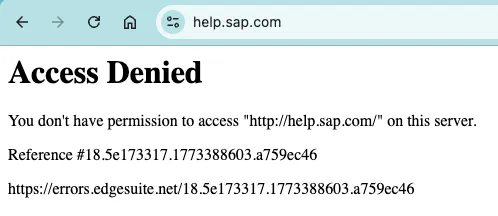
Be aware that SAP might block your IP address after this for a few minutes. The script isn’t doing anything harmful: it only access the linked sitemaps and extracts the URLs listed in them. The problem is that SAP has more than a few sitemap.xml files.
Content access
Depending on the site, the URLs retrieved are way too much. You can search in the txt files for product names or versions and find an entry point. You can then add the page to your RAG list. You might expect that adding content from a URL is an easy task. If you take my website, it is easy: it is plain text. Making this content available to a LLM via RAG is super easy. Other websites however depend on JavaScript. As an example, take SAP Help. SAP Help heavily depends on JavaScript. If you add a SAP Help page to NotebookLM 🔗, it will fail at first.
Provide a URL to add:
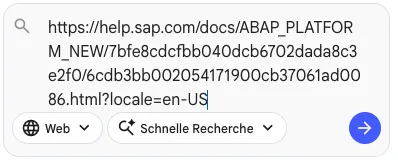
Failure:

Retry: The web site will be added in a second try as NotebookLM finds out that a JavaScript enabled client is needed to access the information.

Another problem might be the content is distributed over several URLs. Depending on the AI you use, you face a limitation on the number of resources you can add. Also, adding links manually works for a limited number of resources. If you want to pressure feed your LLM with knowledge, this approach is not feasable.
Content retrieval
For adding this kind of knowledge to your RAG, you might have to extract the content from several URLs and merge it. For this I created a project that saves websites content as markdown. The project save-websites-as-markdown is available on GitHub 🔗.
You provide a start URL and it goes through the listed URLs and saves links found. Then, the links are access by a browser and the content of the website is saved as markdown.
- Discover links
node crawl.js "https://help.sap.com/docs/ABAP_PLATFORM_NEW/b5670aaaa2364a29935f40b16499972d/48ba073157b85295e10000000a42189b.html" "/docs/ABAP_PLATFORM_NEW" "links.txt"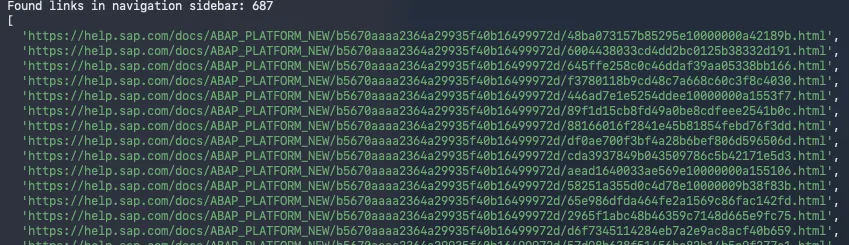
- Save website content as markdown.
node save-page-md.js links.txt pages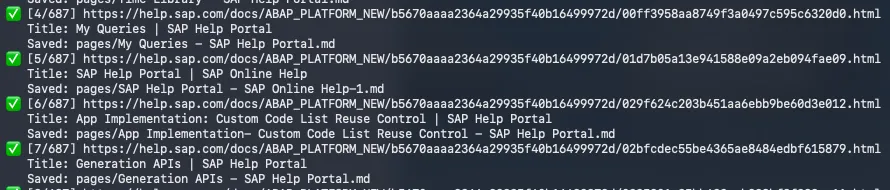
As you provide the main entry page for discovering links, you define which version of the content to convert to markdown. If you are interested in learning for an older release, you can provide it as a parameter. version=2023.002 for 2023 FPS2. for ERP 6 EHP 7: /docs/SAP_ERP?version=6.17.latest&locale=en-US. You can also chose to get the content in a specific language. Just play around with the dropdowns in the page header. Copy&paste the URL and the tool will try to get the links.

- Clean up
find . -type f -name "*.md" -print0 | xargs -0 sed -i '' 's/<!---->//g'This gives the content as markdown. Compared to adding the URL to NotebookLM, the markdown files do not contain redundant information like the navigation, header or footer. It is just the content.
Content usage
Over the time you can get a local library of resources tailored to your specific need. You do not depend on a website being online, or having to deal with new layouts or other blockers. Even when the release is clearly outdated, your LLM has still access to it. And you can use it to validate your ideas. Depending on your use case. On the tools you have available. No more LLM proposing a cool feature it found on the internet, but that is out of reach for you.
Using tools like NotebookLM helps to get a quick overview of the features. Presentations that give a good overview are created in minutes. Depending on the amount and depth of content provided, the LLM can use this to help make decisions: architecture, strategy, development, usage. You might add the latest ABAP clean core or development recommendations, throw in your current guidelines, sample code and feed the LLM with your current release documentation. Then let it update / validate your current guidlines. A task that might have taken weeks or months is accelerated and gives the first results in days.