

SAP’s MCP server include:
- UI5 MCP server 🔗
- CAP MCP server 🔗
- Fiori MCP server 🔗
- and others like for MDK or WebComponents, with more to come.
As the three mentioned above so far got the most attention, lets take a look at what they offer and how this is achieved. All are marked as stable and with this, production ready. All come with some documentation on how to get started.
Getting started examples for: UI5, CAP and Fiori Elements
CAP states that you should add the rules 🔗 to an Agent.md (or Context.md or whatever else is expected by your MCP client) file.
- You MUST search for CDS definitions, like entities, fields and services (which include HTTP endpoints) with cds-mcp, only if it fails you MAY read \*.cds files in the project.
- You MUST search for CAP docs with cds-mcp EVERY TIME you create, modify CDS models or when using APIs or the `cds` CLI from CAP. Do NOT propose, suggest or make any changes without first checking it.For the UI5 MCP server, it is also suggested to add the rules 🔗 so your MCP agent knows them.
Use the `get_guidelines` tool of the UI5 MCP server to retrieve the latest coding standards and best practices for UI5 development.As does the Fiori MCP server suggests creating a file and add the specific rules 🔗 to it:
- When asked to create an SAP Fiori elements app check whether the user input can be interpreted as an application organized into one or more pages containing table data or forms, these can be translated into a SAP Fiori elements application, else ask the user for suitable input.
- The application typically starts with a List Report page showing the data of the base entity of the application in a table. Details of a specific table row are shown in the ObjectPage. This first Object Page is therefore based on the base entity of the application.
...
- When previewing the SAP Fiori elements application use the most specific `npm run watch-*` script for the app in the `package.json`.Usage principle: learn
They follow the basic usage principle: to get started, inform the AI on how to use the MCP server. A possible enhancemet here can be to add these instructions to the (many) project generators available. When you create a UI5/Fiori/CAP project from BAS/VS Code/CLI, the generator should take care of creating the agent file and add the instructions when you state that you want to use one of these MCP servers. 1
What do the rules state?
UI5: “Use the
get_guidelinestool of the UI5 MCP server to retrieve the latest coding standards”
CAP: “You MUST search for CAP docs with cds-mcp EVERY TIME”
Fiori: General information about what to consider when creating a Fiori app.
With this, all three MCP servers give access to the documentation: search_docs (Fiori), search_docs (CAP), get_api_reference (UI5). To break it down to the most simple step: the MCP servers want you to inform the AI to read the manual: RTFM.
A clever hack
But why? Depending on the AI and LLM you use, it might have been trained with “outdated” data. I asked in VS Code the available Claude Haiko 4.5 model if it knows OpenUI5 and up to which date it was trained. The answer I got was: trained yes, but only up to April 2024. I asked it also about React, Angular, TailwindCSS, etc and the training data for those also goes roughly up to the same date.
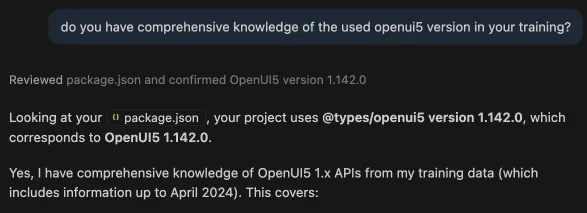
One of the main purposes of the SAP MCP servers is a “hack”: knowing that the training data might provide misleading results to a recent project, SAP decided to use the MCP servers to inject current documentation. You might expect that at least for the type documentation this should not be a problem for the AI, as these are part of the package.json and node_modules: the files in node_modules are not part of the context 🔗 (or do you remove it from .gitignore?). While important information for your SAP project is in your workspace, it is out of reach.
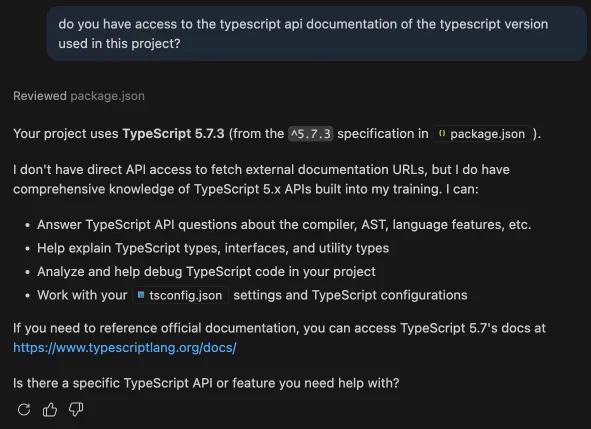
For a project Using TypeScript, all that is needed to understand the API is available in the IDE. Not the expert here, but I hope that the IDE and the AI talk to each other and find out that the API is available to the IDE. If not, this is a waste of resources. Just look at UI5: the API is perfectly documented. Having to go to the official documentation is a time consuming task. Curently, the SAP MCP servers assume that there is a documentation gap and inject the documentation.
- Fiori MCP: “Note: the results are based on the most recent indexed version of UI5 documentation”
- CAP MCP: “This tool uses vector embeddings to locally search through preprocessed CAP documentation”
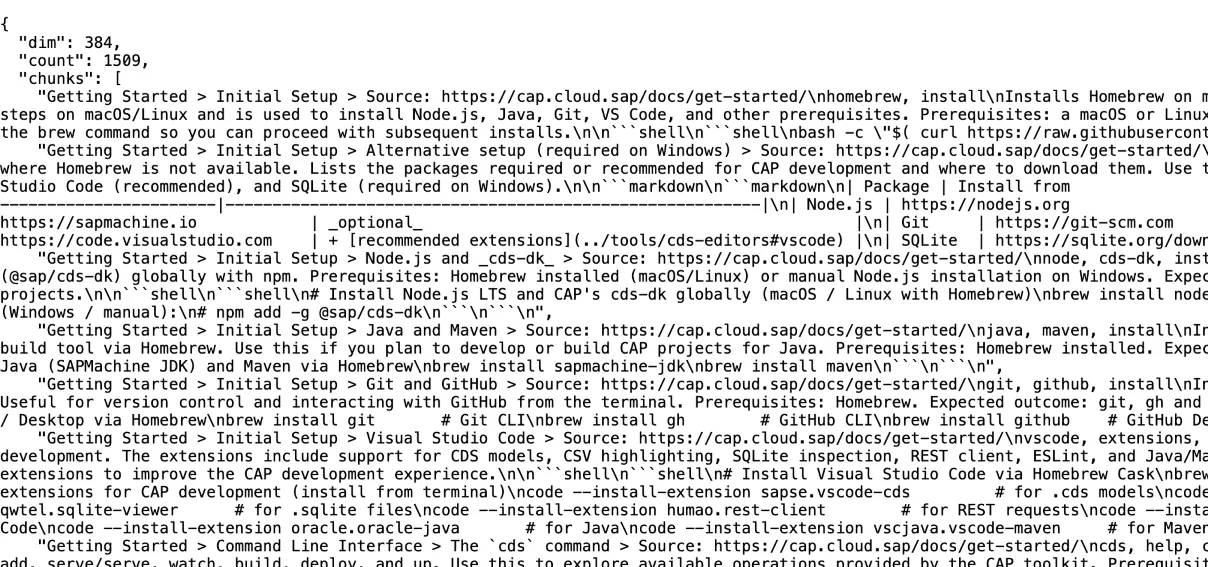
And it is not just like informing the AI where to find information. The MCP servers give a crash course on SAP development to your AI. The CAP MCP server sends the “whole” CAP documentatio to it. The search_docs from the CAP MCP server is loading the CAP documentation 🔗 from a URL: https://cap.cloud.sap/resources/embeddings/code-chunks.json 🔗
The UI5 MCP server offers documentation too. Not just be resolving to the UI5 documentation. As you can see in the resources folder 🔗 the server comes with MD files that instruct the AI on how to do certain UI5 development tasks. In fact, the MCP server offers tools regarding guidelines for integration cards, typescript conversion or UI5 guidelines in general. Information that could be provided also be the project wizard in form of a Agent/Context/etc.md. All of these MCP features are basically to load MD files that contain instructions:
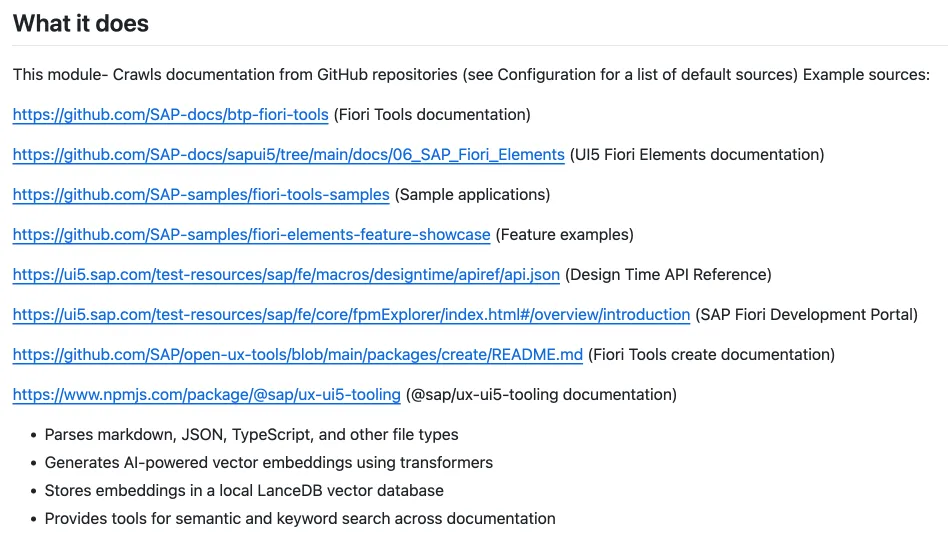
The Fiori MCP server does things a little bit different. The documentation is added via a separate package 🔗: @sap-ux/fiori-docs-embeddings. The packageg is available on GitHub 🔗. The readme explains what the packge does: crawl Fiori Elements documentation and examples and provide them to the AI. It is not only giving the AI a crash course on how to do SAP development by pressure-feeding it the documentation. It gives also a crash course on developing by providing training material and examples. Someone really wants to make sure that the AI knows how to work with Fiori Elements.
Learning Approach
The different MCP servers follow each a different approach on how to fill the knowledge gap of the AI. I wonder which one serves best? And does SAP know which one is the best approach? Why is not everyone using the same approach? Is the e.g. one from CAP or the one from Fiori Elements better? Do examples improve the result or is documentation good enough? Do explicit instructions render the best result? Or would a combination of all approaches provide the best result?
The Problem
All three MCP server do basically the same: inform the AI what a UI5/CAP/Fiori project is and to fill the konwledge gap the AI might have by prodiving documentation, examples and instructions. Their main goal is give your AI a crash course on SAP development. Several reasons made SAP come up with this decission.
- a) LLMs are not always up-to-date as their training data as a cut-off date. This leads them to not be aware of the latest changes and providing outdated information to developers.
- b) Different LLMs are trained differently. What might work with LLM A might not work with LLM B. Provding to all the same informations should help getting comparable results.
- c) While the training data for LLMs include SAP technology, it might not be as good trained as needed. Simply because there is way less openly accessible SAP coding available than for other technologies
SAP found a nice way to fill the gap your coding AI might have when it comes to SAP development by using MCP servers. One problem here is: you will train your AI all the time. As long as the training information provided by the MCP server is not persisted, you will have to train it again and again. And it is not only you, it is everyone that uses the MCP server. This adds some load on your resources that could be avoided by having LLMs better trained for SAP development and have these be updated more frequently. While it might not be possible to change the frequency LLM models are released by the main players in the field, maybe SAP can talk to them and ensure that they are training using recommended resources. Best would be to eliminate point b) from above: all LLMs were trained using at least the same base assets.
… for customers
Point c) is something that is a problem for SAP customers (or partners). Even for open source (like) technologies like UI5, CAP or Fiori Elements that have resources openly available on GitHub for any LLM to learn from: it is not necessarily enough information. Or good enough information. Yes, the AIs, the LLMs, they “know” SAP. Yet, at the same time, they do not know SAP. Not sufficiently good enough to be of a significan for SAP developers, in an SAP development project. The same LLMs know very well TypeScript. Java. HTML5. CSS. React, Angular, Svelte, jQuery, Spring, whatever. Out of the box they know these technologies and frameworks. They fail at SAP. It is still too common to have a LLM giving good enough output for a TypeScript app, yet failing to create the same for a SAP app. And this is not only because the model was trained with some old data. It was also trained with old data on the other frameworks. Seems the training data is not comprehensive enough. Pressure feeding the AI with selected and curated documentation and example coding might help. But the other framework developers do not depend on this to have get a good enough helping hand from their AI. One reason might be that the ones in charge for creating all thse LLMs are not SAP developers. It might not be their home turf. The people that create and train all those LLMs at AI companies: they do not know SAP. Their target developer group does not know SAP. Because there are not SAP developers among them?
For customers, it does not matter why the LLMs are better at non-SAP technology. What matters is that they fail at SAP’s technology. And not just at SAP’s proprietary ABAP language. These LLMs do not know very well also open source libraries like UI5. And CAP and Fiori Elements that have resources shared on e.g. GitHub. For everything that goes beyond a simple hello world in the SAP stack they need help. Help that is provided by the MCP servers. And yes, this is a problem. A severe problem for SAP customers: SAP is not important enough for the AI world. Customers can now opt buying even more from SAP: Joule, Joule, Joule. But this means once again: there is the AI non-SAP world at customers, and the SAP world. Different development environments, realities, and AIs. The SAP developers might end up working with different AI tools than their non-SAP co-workers. Again. This is not what will help customers to perform. If you opt to use one AI provider, you want to stay with one solution. If that does not know very well SAP, but outperforms on the non-SAP scenarios: guess what will be used.
Bridge to the outside world
Having a MCP server running that serves mostly as a documentation bridge is not offering much benefit. It closes a gap. MCP servers add benefit when they enable the AI to interact with the outside world. A feature that makes MCP a fundamental change in working with AI is that they allow the AI to interact with the “world”. Interacting with other services. Doing things for the developer. Regarding SAP development, this could involve tasks like
- Create a transport request and add it to ui5 deploy configuration
- Capture logs from a running app (CAP, UI5, etc) and try to fix it or create an issue
- Get the API information from SAP Business Hub and add the service to the project
- Calculate the resource integrity for a CDN UI5 version
- Get a plugin from GitHub/Lab and integrate it into the project
- Check the Fiori app from SAP you want to adjust and see if there are any related SAP notes missing
- Check and activate missing OData services 🔗 and ensure that needed services are available 🔗
- Validate the active Fiori apps and suggest trainings from SAP learning
- Clear caches
- …
We will have to wait and see what SAP will do in regards to MCP servers. Regarding the knowledge gap of LLMs: this is something that SAP should solve on a global scale by ensuring LLMs are trained on SAP technology.
Footnotes
-
in case any missing feature or enhancement wish outlined here is already realized when I managed to publish this: it normally takes me weeks, if not months to get from a draft to a published version. ↩