

ADT for Eclipse celebrated its 10th anniversary in 2022 🔗. In 2026 it will celebrate 14 years. 14 years in which for at least 10 years people are complaining that ADT for Eclipse is slow. Good news for SAP: the developers are not blaming ADT, but Eclipse for the performance problem. As a root cause for this, very often you can here: Eclipse is slow, because, well, Java is slow. The top list of complaints is lead by: Eclipse is ugly, it is slow, it feels sluggish.
With ADT for VS Code ante portas: is Eclipse slow? I tried it out regarding the startup time. Short answer: No, it is not. It is rather the combination of features that can make it slow.
I tried Eclipse as a bare version, Eclipse for Java Developers, the same + the ABAP Development Tools and a bare Eclipse + ADT. Startup times ranged between 6 to 15 seconds. In the worst case it can take more than the double of time to load. Which means: depending on your environment, what can be an increase of 100% might be even higher (network, RAM, disk, services, etc.).
Bare Eclipse version
- URL: https://download.eclipse.org/eclipse/downloads/drops4/R-4.39-202602260420/ 🔗
- Type: Platform Runtime Binary
- Size: 100 MB ZIP

The startup time is around 6 seconds.
Eclipse for Java Developers
- URL: https://www.eclipse.org/downloads/packages/release/2026-03/r/eclipse-ide-java-developers 🔗
- Type: Eclipse IDE for Java Developers
- Size: 360 MB ZIP

The start uptime is around 10 seconds. The ZIP file is 260 MB larger, and these additional files need to be loaded and scanned by a virus scanner. After the startup Microsoft Defender pops up and gives an explanation of the longer startup time.
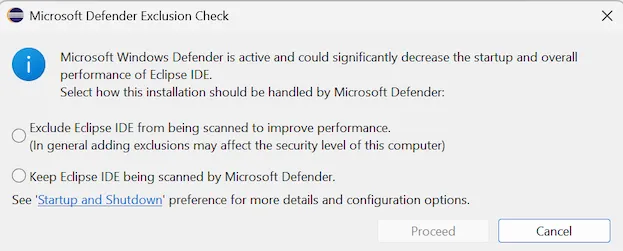
The virus scanner itself identified a problem and is even blaming itself for a performance degregation. If you can, you should exclude Eclipse from being scanned by a virus scanner.
ADT for Eclipse
Adding ADT to the Eclipse IDE for Java Developers adds the ABAP language server.
- URL: https://tools.hana.ondemand.com/latest 🔗
- Type: Eclipse IDE for Java Developers + ABAP Development Tools plugins

The start uptime is around 15 seconds. Adding one more language server (ABAP) increases the startup time by almost 50%. Also, Microsoft Defender is identified as the root cause for this problem.
ADT for Eclipse bare
While the normal recommendation from SAP is to download the Eclipse IDE for Java Developers and add the ADT to it, you can also use the bare Eclipse as a starting point.
- URL: https://download.eclipse.org/eclipse/downloads/drops4/R-4.39-202602260420/ 🔗
- Type: Platform Runtime Binary + ABAP Development Tools

The startup time is around 10 seconds. More or less the same time as it takes Eclipse for Java Developers to load. Less than the Java + ADT plugins. But still significantly longer than a bare Eclipse. For some reason Microsoft Defender was not blamed for the slow performance.
No Virus Scanner
On a personal Windows laptop I deactivated the virus scanner. The bare Eclipse startup time was a little bit more than 4 seconds, while the bare version + ADT was close to 6 seconds. This is 4 to 5 seconds faster than with a virus scanner, on an older laptop with less HW.
Conclusion
Eclipse might be slow, but it is not entirely Eclipse fault. There are some things you can do to speed it up:
- Try to keep your Eclipse installation lean.
- Only add what is needed.
- Deactivate virus scanning of Eclipse.
When Eclipse is slow: maybe first talk to your security and admin team. Chances are good that they are the ones that can increase the performance drastically.