

MCP Servers are a nice way to connect an AI to the real world. The AI isn’t bound to the local knowledge it has. It can interact with its environment. An MCP server allows the AI to call websites, access external information and depending on the features offered of the MCP server, to change data. One question that comes up when running an MCP server is: where to run it?
Transports
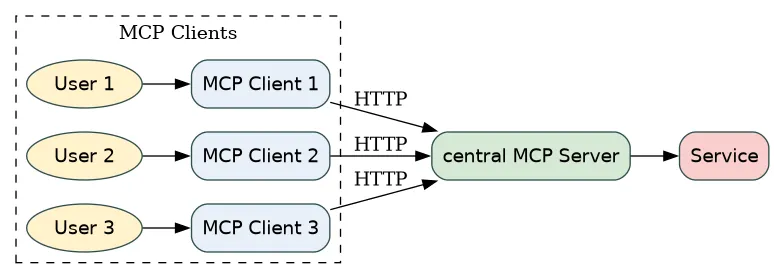
An MCP server can be accessed using STDIO or HTTP 🔗. Recommended is stdio (“Clients SHOULD support stdio whenever possible.”). The difference between both is that with stdio, the MCP Server is run as a sub-process of the MCP client (e.g. VS Code). Using HTTP, the MCP Server is a standalone process. An MCP Server using HTTP can handle multiple clients. That is, one MCP Server can be accessed by several MCP clients. This is not the case when using stdio. Here, one MCP server is used only by the MCP client.
A central MCP server can serve many clients, while giving access to one service.
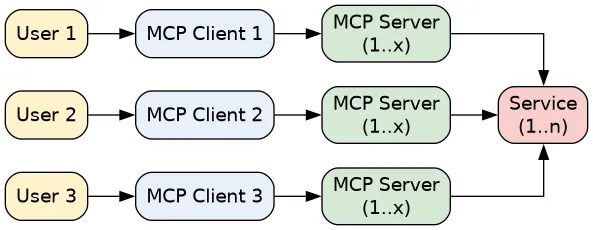
A stdio MCP server is accessed by one MCP client. The service accessed is the same, but is now serving requests from several MCP servers. While the MCP client can start n MCP server, they are bound to the client.
Security hints
For HTTP MCP servers, the specification gives additional hints on how to run those 🔗:
- bind only to localhost
- implement proper authentication
- validate the Origin header
As you can see from the security recommendations, HTTP based MCP servers are intended to be run locally.
Where to run an MCP server
Following the MCP protocol recommendation, it is always local. Running MCP servers only locally might however not be the best choice depending on the use case. It is local first. But can there be HTTP first? I am not going to list possible use cases for each option. This will always an incomplete list. Rather, I go for a different approach. I separate by two rules: manageable and close.
Manageable
Manageable is exactly what it means: being able to manage the MCP server. To be able to control who can access it via e.g. SSO or stop & start of the server. One place to update the server. You can get a central log and overview who is using it as well as the resources accessed by the MCP server. The benefit of manageable is that access and access can be restricted. Stop the MCP server, and no one can use it. Block access for an MCP server at service side, and all requests from MCP clients that want to access the service are blocked. Revoke access, and a user / MCP client cannot connect.
Close
Close comes with two variations:
- close to the MCP client
- close to the code
Close means to run the MCP server close as possible to the MCP client and to the code. While both should be followed, at least one needs to be applied.
Users
What are the possible users for an MCP server? Basically there are two categories: consumers and creators. Those are not just other words for end user and developers. Consumers are not the usual end users. Under this category are people that develop their own AI supported low/no code app, their own AI agent flow and are using MCP servers for this. Creators fall more into the category of real developers. The ones that use MCP servers to develop software: a “normal” application, service, that is used by consumers and end users. The outcome of the work of a creator is e.g. a service consumable by an MCP server.
With this differentiation, the consumer category includes the ones that consume MCP servers in a broader scope of app development or an AI chat. The creators are using MCP servers to develop services that can be used later on by the consumers. By the nature of their role, the creators work with elevated permissions. The result of their work is a high risk artifact. An error there can expose confidential data, compromise the software supply chain. This is because the tools they use provide exclusive usage: IDE, git, SAP / system access, etc. Access rights the consumers normally do not have.
General recommendation
Run your MCP server always as close to the code and client as possible. This means: no central access, always local, always stdio and only for one user. No landscape with a a central MCP server. No HTTP access. When running an MCP server in an agent, the MCP server is part of the agent (flow): included in the runtime - container - or process. This is just like the protocol recommendation: use stdio and do not expose the MCP server to the external access.
Running them close to the code however adds another level: it is not only close to the MCP client, like the IDE. The IDE can be run on the laptop of a creator. This is close to the creator, but not close to the code. The code doesn’t need to be on the laptop, right in the IDE with possible access to all the resources the creator has access to. Close to the code means to adhere to the rules of a code centric environment. This can be in a feature branch, ran in an isolated environment like a GitHub/Lab runner. For creators that need an IDE, close to the code means to have the MCP client, server and code in a remote devcontainer environment. Alternatively, at least in a remote dev environment like VS Code serer in a remote server (for SAP: BAS) The MCP server and code are in a temporary environment, running in a remote environment, controlled by code. A person accessing it from an IDE is just one optional way.
A reason for this is security. In case something goes wrong, the attacker might be able to read the content in the remote devcontainer. But that’s it. No access to the local data on the laptop. Credential wise only the ones provided in the remote environment are available. In case of a feature branch run with instructions for the LLM, the attacker might have compromised the MCP server, but only gets access to a strictly controlled environment that gets eliminated after a short time. Compared to running a compromised MCP server on a laptop over days, with access to the files on a laptop, and to all the available code, repos and keys, this is the better alternative.
A side effect of this is that an MCP server cannot break out and read files or delete them that are not easily recoverable. Deleting files in a remote devcontainer deletes the files provisioned just for that container. No need to worry that corporate documents stored on a cloud storage like OneDrive are deleted or even stolen. Compromising source code in another repo is unlikely, as in the code environment accessible for the MCP server only the current code is - or should be - available. The same for credentials. Accessing the key store of the creator where the credentials to log on to other corporate resources or services is stored is made almost impossible.
In the central architecture - MCP server with HTTP access to many clients - it is sufficient to compromise the MCP server over one security issue and gain access to it. This might even be a rather obscure, complicated security bug that needs some special requirements from the end user side (browser, library, OS, whatever). But when there are several users, the higher the chance that one comes with these requirements to exploit the security issue. Also, an attacker has so many more possible targets to aim for. And when one is successful and the MCP server is compromised, the attacker can get access to all data from all users of the MCP server.
Exception for consumers: manageable
For the consumers, the above recommendation should be followed. However, due to their usage scenario given by the consumer role, a central MCP server is a viable alternative. In a consumer scenario, the MCP server is used to access a service. This can be e.g. a Ticket server from which people can get their open tickets or change ticket status. A central, manageable approach can make sense for the consumers. The central MCP server offering is also what you can find on the SAP architecture recommendation for MCP server 🔗.
This is fine for consumer scenarios. The security issues are still not solved. One compromised MCP server means that all users of it are having a severe security issue. Normally this is not as bad as when this happens to the creators. Imagine a creator being compromised, and the attacker is using this to compromise an MCP server developed by the creator? The attacker did not only manage to gain access over one creator, but over the artifact created: another MCP server. Which is then be used by hundred, thousands or more consumers.
Central HTTP MCP server.
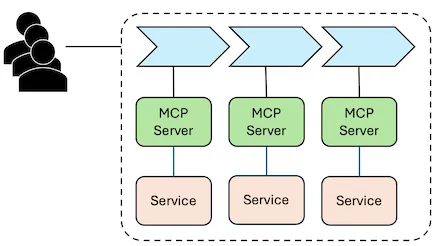
One MCP server compromised.
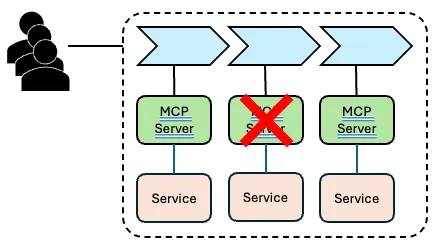
Result: all consumers of the process that uses the compromised MCP server are affected. This is worse than the alternative of an MCP server running close to the code and as a sub-process of the MCP client. Reaching the same amount of users, the attacker would need to compromise all installation of the MCP server for all users. That is a different level of complexity.
Therefore, run your MCP server not as an HTTP server. Only do so when the possible impact of a compromised MCP server is manageable and is more or less the only way to run it in a process in a usable way.