

Off-stack ABAP development. Why isn’t everyone trying this out? Of course, ABAP devs are bound to corporate environments. Some might never have heard of git. It might be not the smallest number, higher than expected, but still not so high, nor an excuse. What hinders ABAP devs more is that the documentation could be better. The documentation for the ABAP transpiler and its dependencies 🔗 and the linter are rather for people that know Node.js, JavaScript and are familiar with the principle: the code is the documentation. This might sound like a problem every capable programmer should be able to solve. But we have to acknowledge that for many ABAP devs Node.js or JavaScript is just unknown land.
To explore, explain and (make others) adopt off-stack ABAP development I wrote a simple example app. It’s available on GitHub 🔗. The app serves as an example on how to get started with off-stack ABAP development.
The app uses tools from the master of ABAP coding: Lars 🔗. Lars did a great job here: not only bringing git to ABAP (abapGit 🔗), but also enabling off-stack ABAP development via an ABAP to JavaScript transpiler 🔗, ABAP linting tool 🔗 and pushing ABAP file formats 🔗. Connecting the dots allow you to write ABAP code wherever, whenever you want, check the syntax for errors and run it without an ABAP server available.
My repo helps in getting started and guides you through several steps and examples like linting, unit test reports or code coverage. This might still be too complex for some, or too abstract. Let me try to provide a walkthrough. At the end, you should be able to write an ABAP class and unit test locally, lint it, transpile it to JavaScript, run the unit tests and get the code coverage.
Note: The walkthrough starts with an empty directory. If something doesn’t work, you can take a look at the repo or clone it. If you don’t know what to do: consider asking Google.
Prerequisites
Get started by install the latestNode.js 🔗 long term supported version on your laptop. You might also want to install VS Code 🔗 or any other text editor. This might be a challenge for everyone in Citrix or with a locked down laptop. I hope your company has some experience with these tools. If not, maybe try this out on your private computer.
Initialize project
Initialize the project. ABAP files are going to be stored in folder src.
npm init -y
mkdir srcNote: no package will be used. The coding is not intended to be deployed to a ABAP system.
Add a sample ABAP Class
Create a new file in folder src.
Filename: zcl_test.clas.abap
CLASS zcl_test DEFINITION
PUBLIC
FINAL
CREATE PUBLIC.
PUBLIC SECTION.
CLASS-METHODS add
IMPORTING
num1 TYPE i
num2 TYPE i
RETURNING
VALUE(sum) TYPE i.
PROTECTED SECTION.
PRIVATE SECTION.
ENDCLASS.
CLASS zcl_test IMPLEMENTATION.
METHOD add.
sum = num1 + num2.
ENDMETHOD.
ENDCLASS.Add unit test
Create a new file in folder src.
Filename: zcl_test.clas.testclasses.abap
CLASS lcl_test_add DEFINITION FOR TESTING
DURATION SHORT
RISK LEVEL HARMLESS.
PRIVATE SECTION.
METHODS:
test_positive_numbers FOR TESTING,
test_negative_numbers FOR TESTING.
ENDCLASS.
CLASS lcl_test_add IMPLEMENTATION.
METHOD test_positive_numbers.
DATA(result) = zcl_test=>add( num1 = 5 num2 = 10 ).
cl_abap_unit_assert=>assert_equals(
act = result
exp = 15
msg = 'Error adding two positive numbers.' ).
ENDMETHOD.
METHOD test_negative_numbers.
DATA(result) = zcl_test=>add( num1 = -3 num2 = -7 ).
cl_abap_unit_assert=>assert_equals(
act = result
exp = -10
msg = 'Error adding two negative numbers.' ).
ENDMETHOD.
ENDCLASS.As a result you have now one text file with ABAP code and one text file with a ABAP unit test. Both cannot be run, validated nor tested. For this, ABAP transpiler and abaplint are needed.
ABAP class as text conclusion
So far, you can write ABAP code in a text file. This helps to capture down an idea, but is of no value. You would need at least to add this file to git and import it into your SAP system using abapGit. This gets you the most basic version of off-stack ABAP development. From a quality point of view this is not what you want. The ABAP coding should at least have a valid syntax.
Note: filenames are the sames as if you’d have created the code first in an SAP system and then added to git via abapGit.
ABAP linter
Install abaplint.
npm install @abaplint/cli --save-devConfigure abaplint: create file abaplint.json. Use the sample content from getting started from abaplint 🔗.
Create file abaplint.json
{
"global": {
"files": "/src/**/*.*",
"skipGeneratedFunctionGroups": true
},
"dependencies": [
{
"url": "https://github.com/abaplint/deps",
"folder": "/deps",
"files": "/src/**/*.*"
}
],
"syntax": {
"version": {
"release": "v793",
"language": "Normal"
},
"errorNamespace": "^(Z|Y|LCL_|TY_|LIF_)"
},
"rules": {
"begin_end_names": true,
"cds_parser_error": true,
"allowed_object_naming": true,
"check_ddic": true,
"check_include": true,
"check_syntax": true,
"identical_form_names": true,
"global_class": true,
"implement_methods": true,
"method_implemented_twice": true,
"parser_error": true,
"superclass_final": true,
"unknown_types": true,
"xml_consistency": true
}
}Add the lint script to package.json
"scripts": {
"lint": "abaplint"
},Now you can already the linter against your ABAP code. Yes, off-stack. No ABAP server involved.
npm run lint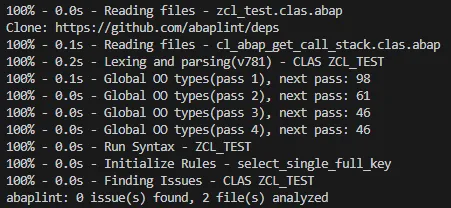
To trigger a linting error, add an erroneous data definition to method run of the ABAP class:
METHOD add.
DATA: BEGIN OF stru,
field TYPE i,
END OF struk.
sum = num1 + num2.
ENDMETHOD.Note: error is caused by stru and struk.
npm run lint gives now an error.

Another error can be triggered by using a not declared variable. Adding to method run:
write: lt_test.Abaplint reports this as:
src\zcl_test.clas.abap[24, 12] - "lt_test" not found, findTop (check_syntax) [E]The rules abaplint checks for can be configured in the abaplint.json file. An overview of the available rules is available 🔗.
Before continuing: Remove the erroneous statements.
ABAP linter conclusion
Running abaplint over your ABAP code is the first step where value is added to your off-stack ABAP development setup. The ABAP syntax gets checked. Based on the defined rules, the ABAP coding passes or fails the checks. Getting this ABAP code into your SAP system means that a certain level of quality is already met.
ABAP Transpiler
The ABAP coding can now be checked for linting errors. Next step is to transpile the coding to JavaScript. This enables the off-stack execution of the code. ABAP code is translated to JavaScript and run as a Node.js app. This does not only check if the coding can be compiled (activated), but also you can execute / run it. If you have coding that prints out text using write statements, these messages are shown in the output.
Add transpiler
npm i @abaplint/transpiler-cli --save-devAdd transpiler configuration: abap_transpile.json
{
"input_folder": ["src"],
"output_folder": "output",
"input_filter": [],
"libs": [
{
"url": "https://github.com/open-abap/open-abap-core"
},
{
"url": "https://github.com/open-abap/open-abap-seo"
}
],
"write_unit_tests": true,
"write_source_map": true,
"options": {
"ignoreSyntaxCheck": false,
"addFilenames": true,
"addCommonJS": true,
"skip": [],
"unknownTypes": "runtimeError",
"populateTables": {
"reposrc": false
}
}
}Add script to package.json
"transpile": "abap_transpile"Convert your ABAP code to JavaScript:
npm run transpile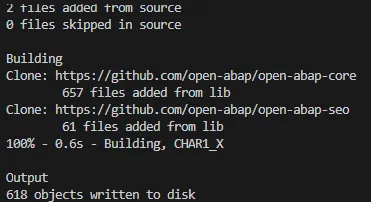
The folder output contains now close to 900 files. Yes, you had only 2 ABAP files in src created. But the transpilation of this coding will add also all dependencies defined in the JSON config under: libs. All the files found under the given URLs are added:
This is needed for the JavaScript app to work.
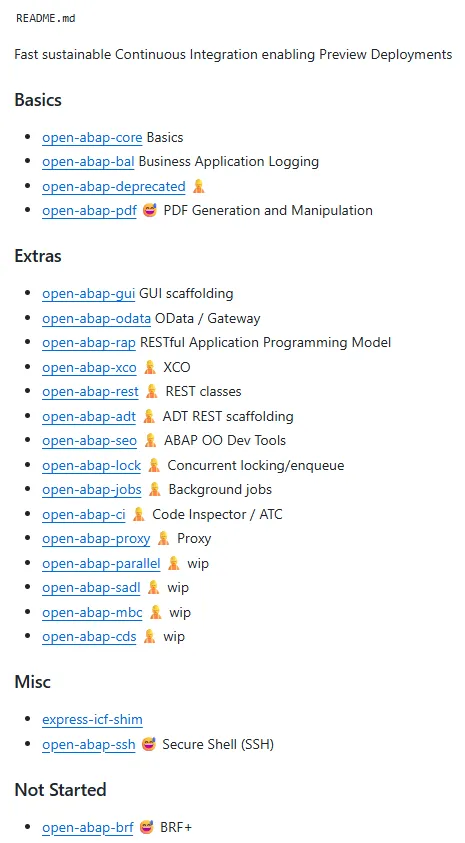
A list of available dependencies can be found at open-abap 🔗.
Note: Transpiling will fail when a syntax error is found, like a missing . or unknown variable.
Transpiler conclusion
Transpiling ABAP code to JavaScript allows finding out if the coding can be transpiled. It does not mean that it is correct and working. The code might even have references to unknown classes or methods. Adding a non-existing reference to method run and transpiling will still work:
data(cltest) = new zcl_my_test( ).
call function 'test_function'.Removing a . or use CLAS instead of CLASS will make transpiling fail. Transpiling means that your ABAP code is syntactically correct, but says nothing about if coding can be used.
Execute ABAP locally
The transpiled ABAP code can be run as a Node.js application. For this, add the @abaplint/runtime package.
npm i @abaplint/runtime --save-devAdd the run script to your package.json
"test": "node output/index.mjs"To get an output on the console when running the ABAP code, change method add:
METHOD add.
sum = num1 + num2.
write: / sum.
skip.
ENDMETHOD.Transpile the code and run it.
npm run transpile
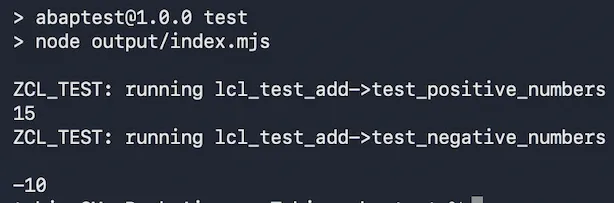
npm run testRunning index.mjs runs the unit tests. As the add method writes text, this text is shown as output:
ZCL_TEST: running lcl_test_add->test_positive_numbers
15
ZCL_TEST: running lcl_test_add->test_negative_numbers

-10
Taking the example from transpile, add a statement that will make the app fail. Add this to method run:
data(cltest) = new zcl_my_test( ).Transpile the code and run it
npm run transpile
npm run test
Note: Remove the erroneous line added earlier.
Execute ABAP locally conclusion
Running validates your ABAP coding. It shows if the code works. For off-stack ABAP development, this is an important step. It is now not only possible to do static checks of the ABAP code. You can now validate the code: does it run? What is the output? Coding does not necessarily mean to have a human-readable output when running a class. There might be no output at all, only methods. This is where unit testing helps. Transpiling ABAP code comes with the feature of running unit tests. This allows to test ABAP code.
Unit Test
Being able to run the ABAP code means being able to run unit tests. The config files instructs the transpiler to write the unit test files too. As a result, in the previous step, when running the ABAP code as a Node.js app, the unit tests were executed. The ABAP class written does not more than adding two numbers. The class itself is not runable. To get the output implemented in method add, the unit test was used. Running the test script, the output/index.mjs file, runs already the unit tests.
In case a unit test fails, an error is shown. For instance, in the test method test_negative_numbers, change the exp value from -10 to -15.
File: src/zcl_test.clas.testclasses.abap
METHOD test_negative_numbers.
DATA(result) = zcl_test=>add( num1 = -3 num2 = -7 ).
cl_abap_unit_assert=>assert_equals(
act = result
exp = -15
msg = 'Error adding two negative numbers.' ).
ENDMETHOD.Run the unit test now and it will fail.
npm run transpile
npm run test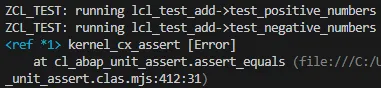
Unit test conclusion
Running the unit tests on Node.js allows validating the ABAP code. You can now not only run the code, but you can run the unit tests. Completely outside an SAP ABAP environment. This is the famous game changer. This allows to validate ABAP coding: does it compile, run and pass the unit tests? Doing this off-stack allows ensuring that only tested ABAP code enters the SAP system.
The benefit of this gets obvious when using AI supported coding … or when you want to do the AI the coding. Instead of giving the AI access to your SAP system - directly via the file system or MCP server - the AI won’t touch your precious SAP system. The AI stays out of it. This takes load off your SAP system, and speeds up AI development. Currently, changing ABAP code means that the AI writes the code, sends it to the SAP system, activates it, runs unit tests on the SAP system, and does this constantly. ABAP is still a challenge for LLMs. When you look at how currently ABAP code is developed, it is very much a trial and error approach. While this is OK, it means that the AI depends on the SAP system to validate the code. Involving an SAP system just to find out the syntax is wrong? To lint source code? To run a unit test? This can be done off-stack, faster, AI friendly.
Unit test reporting
Having the possibility to run unit tests and showing an error is great. Better is to have a way to report on this. In Java, you have JUnit 🔗 and unit test reporting 🔗. These reports are great as they give insights into your unit tests. And not only for computers, but also for humans.
It seems that the ABAP transpiler is not creating a unit reporter friendly output. It prints the test runs to console, but not in a way that can be used as input for a unit reporter. Thanks to AI, I wrote a script that patches the transpiler index.mjs and a script that generates a unit report. You’ll need to download it from the GitHub repo of the sample app 🔗.
- Patch script: test/patch-runner.mjs - download 🔗
- Unit reporter: test/run-unit.mjs download 🔗
Create directory test and add the two files there.
mkdir testAdd the script to package.json:
"scripts": {
"patch-runner": "node test/patch-runner.mjs output/index.mjs",
"test:unit": "npm run transpile && npm run patch-runner && node test/run-unit.mjs"You can now run the unit test:
npm run test:unit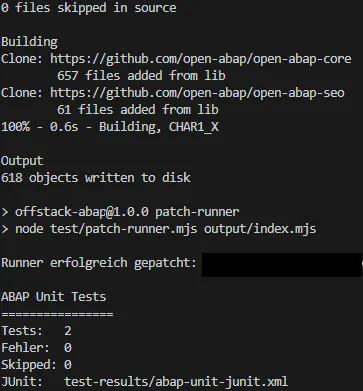
The new, patched test runner stores the result in the file test-results/abap-unit-junit.xml. This xml can be used by e.g. SonarQube or Allure to display the test runner report.
<?xml version="1.0" encoding="UTF-8"?>
<testsuites tests="2"
failures="0"
errors="0"
skipped="0"
time="0.004716">
<testsuite name="ABAP Unit"
tests="2"
failures="0"
errors="0"
skipped="0"
time="0.004716">
<testcase classname="ZCL_TEST.lcl_test_add" name="test_positive_numbers" time="0.004499">
</testcase>
<testcase classname="ZCL_TEST.lcl_test_add" name="test_negative_numbers" time="0.000217">
</testcase>
</testsuite>
</testsuites>This is the machine readable output. To transform this into a nicer format, Allure Report 🔗 can be used.
Install allure as a dependency to the project.
npm i allure --save-devAdd the script to package.json to let allure create the report out of the previously generated ABAP unit run xml.
"report": "allure generate test-results"Run the script to let allure read the xml and generate the report.
npm run reportThe generated report can be found in folder allure-report. The report is an HTML page which can be opened in a browser.
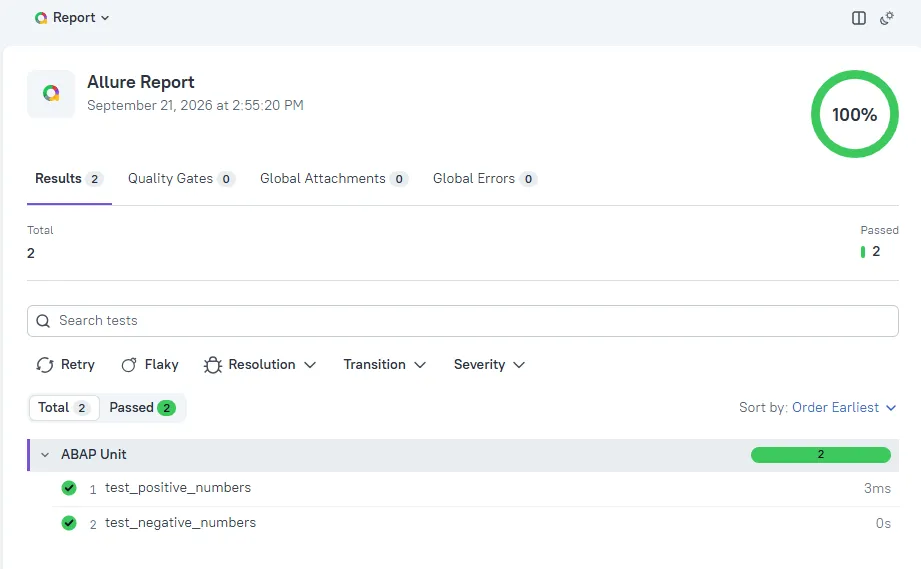
Note: opening the report directly in your browser won’t work. Run a local web server to access the report. If you do not have one available e.g. in VS Code, allure comes with a feature to run a local web server.
npx allure open allure-reportUnit test reporting conclusion
Being able to report on the unit tests is another important step for off-stack ABAP development and AI development. Not only is it possible to run unit tests, you can also get the results of the tests. You can report on them. You can see which tests are failing and even get a history. And use it in your CI pipeline to ensure only code passing unit tests is added.
Code coverage
Another metric you might want to check off-stack is code coverage. Specially for AI supported development, you might ask the AI to ensure that x% of new code are covered by a unit test. Instead of having to copy the ABAP code to the server, run the unit tests, get the coverage and let the AI read the result, this is something that can be done easily off-stack. Again, no load on your ABAP server caused by the AI. Not having to send x times a file and let it check by your SAP server. And if you do not use AI: you can run your unit tests and get the code coverage without having an SAP server available. Additionally, you can create your change in a branch and only let it merge when not only the unit test pass, but also only when enough of your new code was tested.
C8 🔗 is a good tool to get the code coverage for a Node.js app.
npm i c8 --save-devAdd the code coverage script to package.json
"scripts": {
"coverage": "c8 --all --include \"output/zcl_test.clas.mjs\" --exclude \"output/zcl_test.clas.testclasses.mjs\" --reporter=text --reporter=html --reporter=lcov node output/index.mjs"To capture the code coverage, you only need to transpile the ABAP code and run code coverage.
npm run coverage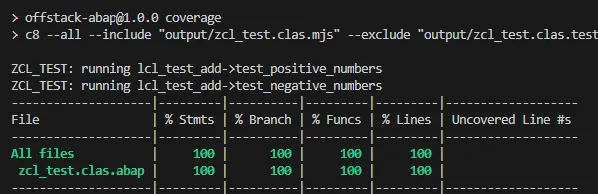
Specifying the reports ensure that the output is available in several formats. Formatter html gives an HTML report. Perfect for humans to read. Formatter lcov can be used by your IDE and text displays the result on console. Code coverage output and reports are stored in folder coverage.
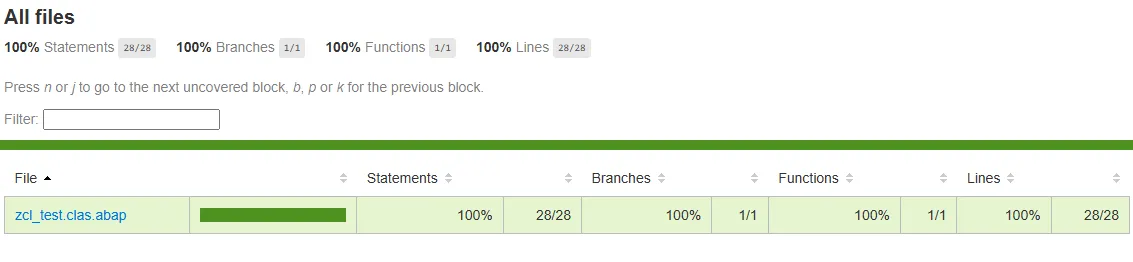
The HTML report even shows the coverage on the ABAP source code. (you should be able to open the report directly in your browser, no web server needed).
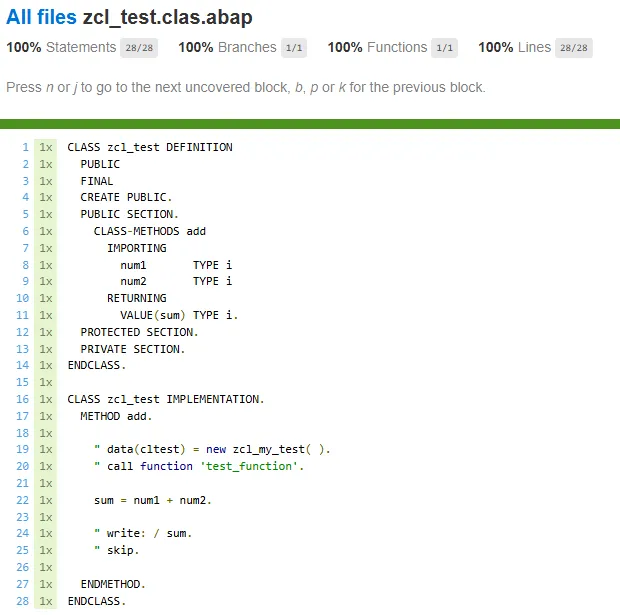
To validate that the coverage works, add a new method to the class that isn’t called by the unit test.
" at private section
METHODS add_test.
" in implememtation
METHOD add_test.
write: / 'Test.'.
ENDMETHOD.npm run transpile
npm run coverage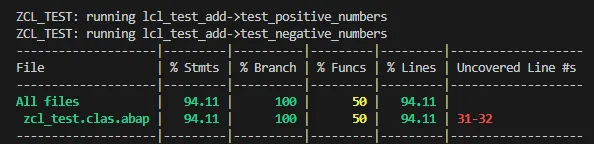
The report on class level marks the not covered code in red.
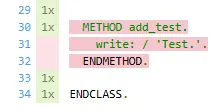
In case you have several ABAP classes you’ll have to configure the include parameter. Adding the folder output will make c8 report the coverage for every file found in the folder. This is not what you want. The folder contains many files added by ABAP transpiler to be able to run the app. These files are not part of your ABAP codeing and can be ignored for the coverage report.
npx c8 --all --include "output/" --reporter=text --reporter=html --reporter=lcov node output/index.mjs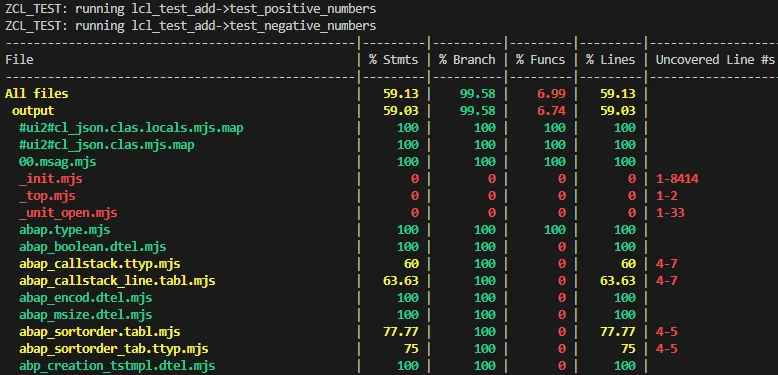
To get the coverage only for your ABAP code, only include your files.
"coverage": "c8 --all --include \"output/**/zcl_*.mjs\" --exclude \"output/**/zcl_*.testclasses.mjs\" --exclude \"output/index.mjs\" --reporter=text --reporter=html --reporter=lcov node output/index.mjs"Knowing the code coverage of the unit test file might be interesting, but normally you want to disable capturing the coverage of your unit test class. The test classes can be disabled by adding them to the exclude parameter.
--exclude \"output/**/zcl_*.testclasses.mjs\"The code coverage is not only available as a report. The lcov.info file can be used by many coverage tools to display the coverage data. In VS Code, you can use an extension like Coverage Gutters to get the coverage data displayed directly in the editor.
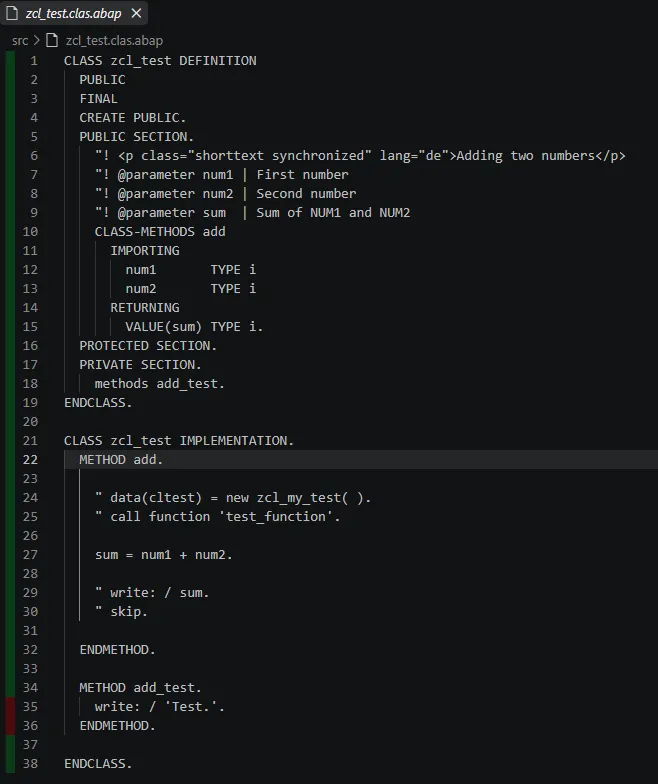
This information is than also displayed in the footer:

Code coverage conclusion
Code coverage is one more important step when it comes to ensure a certain level of quality in your development process. Specially, for AI supported development, being able to capture this piece of information brings the whole process to a new level. The code can be created in a (feature) branch, developed, compiled, tested, and when enough of the (new) code is tested by a unit test, only then the code gets merged. Important: all without touching an SAP system. The code can then be imported into the SAP ABAP system and already shows a certain level of maturity. Ensuring this level of quality is done without the need of a running, working, configured, and accessible ABAP system. All done off-stack. Locally. Somewhere were Node.js runs.
ABAP Doc
ABAP developers often work with ABAP Doc only inside their IDE. The methods are documented, but the documentation is used when developing code and looking up the description of a method. Outside the ABAP world, you can find code projects where the (API) documentation done with JavaDoc or JSDoc is made available as a web page. People can read the documentation without having to access a system, or having to open a code editor. It makes sense to have the code documentation available along the source code. For this, all you need is to transfrom the ABAP Doc comments into a web page, like you can for JavaDoc 🔗. Seems there is no rael ABAP Doc -> web page tool available that works standalone. There is one in ADT 🔗, but that one needs … ADT.
Add some ABAP Doc comments to your ABAP code.
"! <p class="shorttext synchronized" lang="de">Adding two numbers</p>
"! @parameter num1 | First number
"! @parameter num2 | Second number
"! @parameter sum | Sum of NUM1 and NUM2In the app repo there is a JavaScript file that creates a HTML site out of ABAP Doc: test/generate-abap-doc.mjs
- Script: test/generate-abap-doc.mjs download 🔗
Add the script to directory test.
Add the script to package.json:
"docs": "node test/generate-abap-doc.mjs src docs",Run the ABAP doc HTML generation script:
npm run docs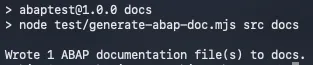
The generated HTML files are in folder docs.
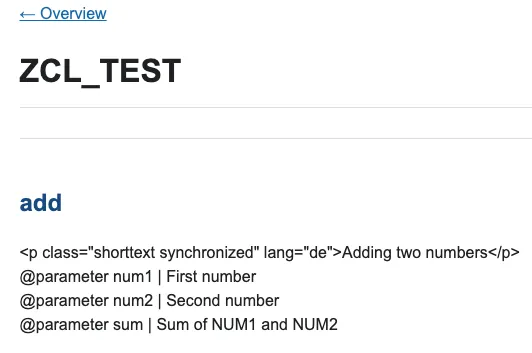
Not the best looking ABAP Doc website, but better than nothing and I think you get the idea. You might use an AI to improve the tooling and get an easy to navigate website documenting your ABAP code. This can be accessed outside SAP, like in the GitHub/GitLab repo.
Enterprise Ready
You might have noticed that some modifications were needed to not only run ABAP code off-stack, but to also report on the result. Getting a report on the unit test run is mandatory when you want to track the results and not just have a simple: worked / fail status. Same for the source code documentation. It’s an asset you want to have and make accessible. This is very much common standard and coding best practices.