

The audit that comes too late
You know the scene. The app is done, the go-live date is set, and then someone from architecture finally finds the time to look at it. The verdict of the audit? The namespace doesn’t follow the company convention. There’s no TypeScript, even though it’s mandatory. The mock server was never set up, there are no UI tests, and the app ships with two languages instead of the requested three.
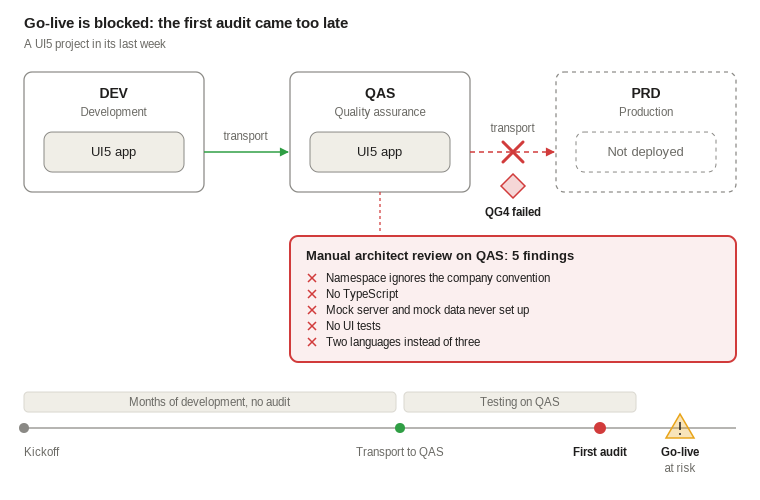
The app works. All of this is a finding caught by a manual check validating corporate governance rules. None of this is a bug. And all of it arrives in the one week nobody has time for it.
Independent of the app type: company standards get checked late, or never. UI5 BlueprintAudit 🔗 moves that check to the start of the project, when deviations are still cheap to fix and don’t put the go-live date at risk.
We lint everything except our own rules
Code quality is covered. ESLint and @ui5/linter catch coding mistakes and deprecated APIs, security scanners worry about dependencies, and UI5 best practices are documented to death.
Your company’s own rules are a different story. Namespace convention, usage of TypeScript or JavaScript, OData models, mock data, the supported languages, launchpad and deployment config, tests that actually exist. These specs live in a document nobody has opened since the kickoff, and checking them means someone having too much time reading them. So it rarely happens, and when, too often too late.
The honest reason: there was no tool for it. And what nobody measures, nobody enforces.
UI5 Blueprint Audit
UI5 Blueprint Audit checks a UI5 based project against your company blueprint: folder structure, manifest, configuration. It’s not yet another linter. It checks exactly what your code linter politely ignores. Reports come as Markdown, HTML or JUnit, so humans and pipelines both get what they like.
It ships 33 rules 🔗, each with a sensible default severity, so the first run is useful before you’ve configured anything:
| Category | Examples |
|---|---|
| Namespace | namespace, consistent-namespace |
| Technology | typescript, xml-views, no-custom-controls, no-custom-css |
| Data | odata-service, odata-metadata-local, odata-mockdata, mockserver-config |
| Structure | folder-structure, fragments-folder, controller-matches-view |
| i18n | i18n-used, i18n-languages, i18n-fallback |
| Configuration | ui5-version, theme, flp-config, deploy-config, app-version |
| Tests | qunit-opa-tests, wdi5-tests, playwright-tests |
Built for real projects, not slide decks
- Rules follow the project type.
--type fs,feorlibdecides which rules run. - One YAML per project.
ui5-blueprint-audit.yamlsits in the repo: severities, parameters, rules switched off. - The architect sets the standard. Enterprise architects define the blueprint, project architects derive the YAML and hand it over. Developers stop guessing and start running.
- Your rules too. Every company has that one special rule. Write it as a small plugin 🔗, register it under
plugins:.
When the audit kicks in
Nobody has to pass every rule on day one. Some take time: offering all UI tests and mock data isn’t done over lunch. So the audit gets stricter gate by gate. This is up to the company to decide.
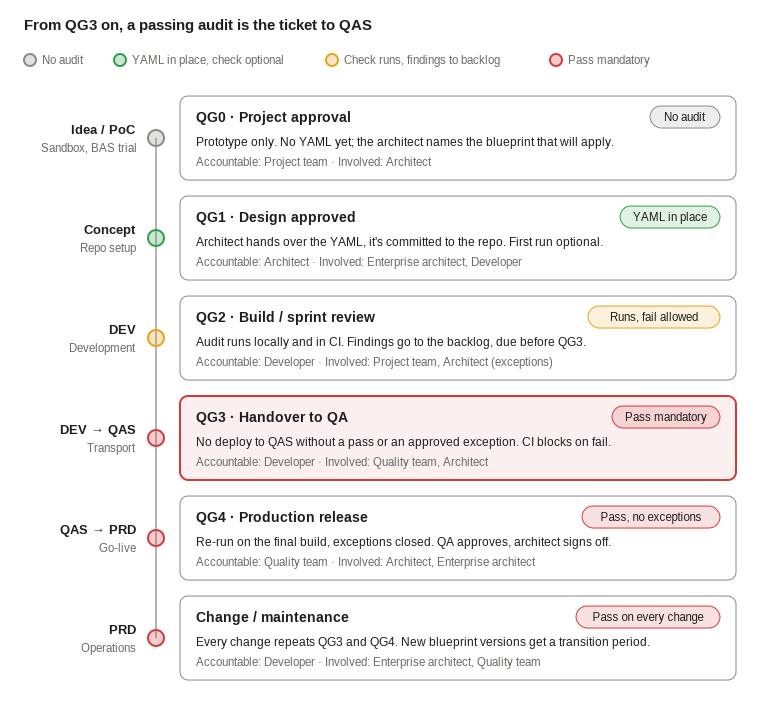
The architect hands over the YAML by QG1. In DEV the audit runs with every build, but failures only create backlog items. From QG3 on it’s simple: no pass, no QAS. The go-live week stays boring, which is exactly how it should be. Integrate the audit results into your pipeline and apps will only deploy when they pass the quality gate.
Example: a Fiori Elements app
Take a List Report / Object Page app and open the project root:
npm install --save-dev @abap/ui5-blueprint-audit
npx @abap/ui5-blueprint-audit --init--init creates ui5-blueprint-audit.yaml. That’s where the architect’s blueprint goes, for example:
projectType: fe
rules:
namespace: [error, { value: "com.acme.sales" }]
odata-mockdata: [warn, { mode: one-entity }]The namespace is now enforced. The mock data check, off by default, starts as a warning, so the team can build mock data before it turns into a blocker. Then run:
npx @abap/ui5-blueprint-audit --type feWith --type fe you get the Fiori Elements rule set: OData service, local metadata, mock server config, i18n, launchpad and deployment config, tests. Custom controls and custom CSS earn a raised eyebrow. Freestyle-only rules stay quiet. Put the output report into your pipeline, and QG3 checks itself.
Try it
Pick any project, swap fe for fs or lib if needed, and run it.
The first run is the fun one. Most teams find something: a missing language, a namespace that drifted, a test folder that has been empty since the kickoff. Better to find out today than in go-live week.
The code is on GitHub 🔗, and the documentation 🔗 covers every rule. Try it, then tell me what your company checks that the audit doesn’t yet. Issues and pull requests welcome.