

After the server certificate is installed, ICM should automatically make use of it. To see if SSL/TLS connections are now working, two tests should be executed:
- Check SSL port setup
- Access service using TLS
1. Making Sure the SSL Port is set up correctly
This step checks that ICM is configured to accept TLS connections. SAP Help 🔗
Transaction: SMICM
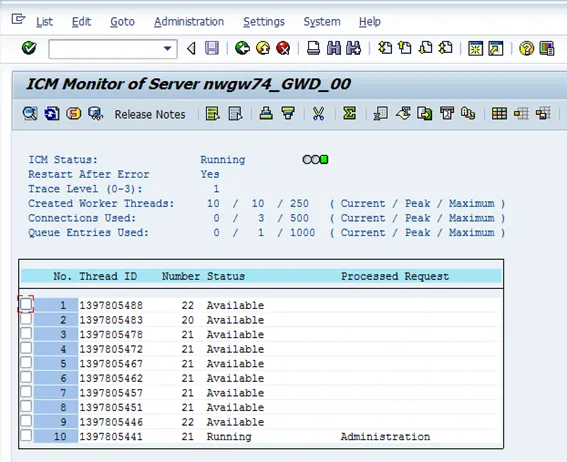
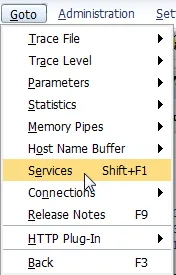
Select: Goto from the menu and then Services.
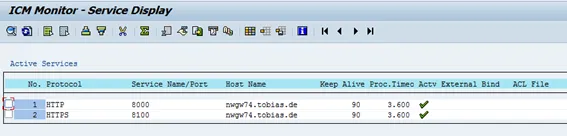
Check that HTTPS is listed and note the port number. Here: 8100.
2. Testing the Connection for SSL Server Authentication
With ICM configured to accept TLS connections on port 8100, the last test is to check if it works with a browser. SAP Help 🔗. Open a service in your web browser. To check that the service Works, open it first in normal HTTP.
Example: http://nwgw74.tobias.de:8000/sap/opu/odata/iwfnd/rmtsampleflight/ 🔗
If the worked, open the URL as HTTPS.
Example: https://nwgw74.tobias.de:8100/sap/opu/odata/iwfnd/rmtsampleflight/ 🔗
Check the certificate used by ICM.
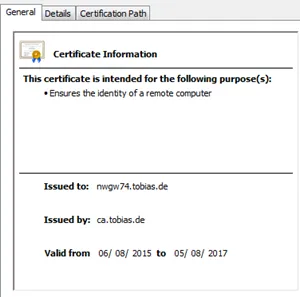
Result
The server certificate is issued by ca.tobias.de to nwgw74.tobias.de. This shows that the SSL certificate of the right PSE is being used by ICM.