The configuration steps to be executed on the backend (BEP) are detailed at SAP Help 🔗. The steps are for the OData Channel Service for backend system.
- Settings for Idempotent services SAP Help 🔗
- Defining a remote function call to SAP Gateway Blog 🔗 / SAP Help 🔗
- Connection settings to SAP Gateway Blog 🔗 / SAP Help 🔗
- Configure bgRFC supervisor destination Blog 🔗 / SAP Help 🔗
This document explains how to execute step 1.
Ensure that a HTTP request is executed only once. Important for request that alter the data at the server (POST, PUT, DELETE). These request must be executed at most one time. SAP Help 🔗
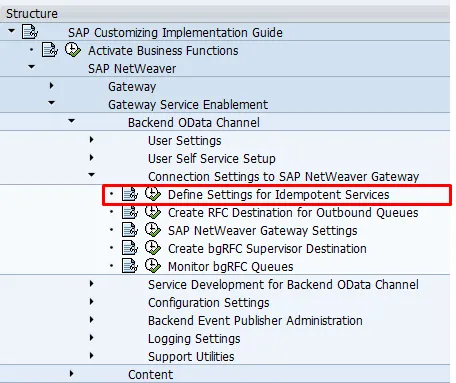
SPRO: SAP Reference IMG and navigate to  SAP NetWeaver
  Gateway Service Enablement Backend OData Channel Connection Settings to SAP NetWeaver Gateway Define Settings for Idempotent Services
  .
.
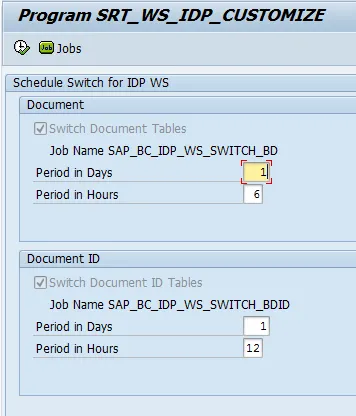
- Enter the following default values:
- For Period Hours in Document the typical value is 6.
- For Period Hours in Document ID the typical value is 12.
-
Choose Schedule.
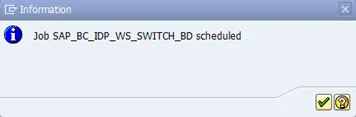
A message displays confirming that the job has been scheduled.
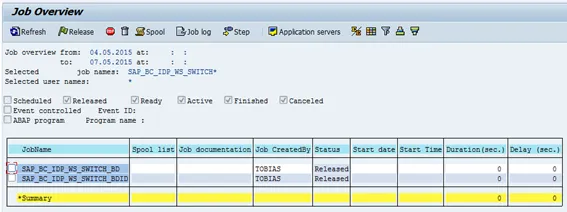
To check if it worked, go to transaction SM37. Enter SAP_BC_IDP_WS_SWITCH* as job name
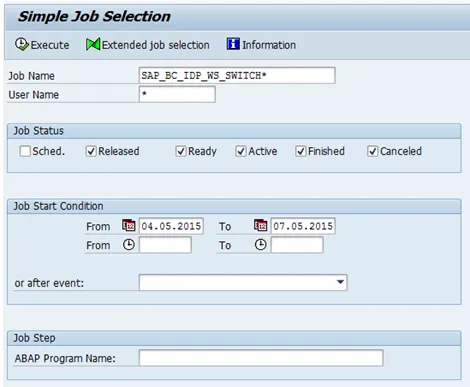
Run the report.