

The configuration steps to be executed on the backend (BEP) are detailed at SAP Help 🔗. The steps are for the OData Channel Service for backend system.
- Settings for Idempotent services Blog 🔗 / SAP Help 🔗
- Defining a remote function call to SAP Gateway Blog 🔗 / SAP Help 🔗
- Connection settings to SAP Gateway SAP Help 🔗
- Configure bgRFC supervisor destination Blog 🔗 / SAP Help 🔗
This document explains how to execute step 3.
Ensure that ABAP Backend (BEP) can communicate with SAP Gateway. SAP Help 🔗
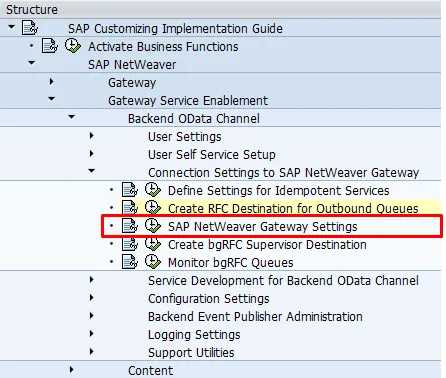
SPRO: SAP Reference IMG and navigate to  SAP NetWeaver
  Gateway Service Enablement Backend OData Channel Connection Settings to SAP NetWeaver Gateway SAP NetWeaver Gateway Settings
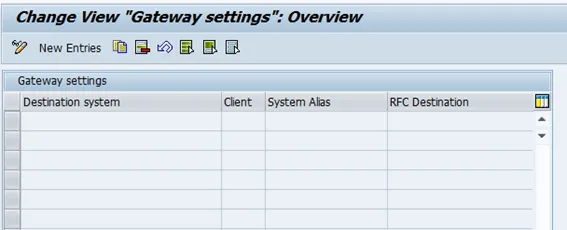
- Click on “New Entries”
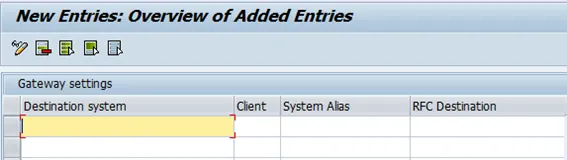
-
Destination System: SID of the SAP Gateway HUB (FND) system.
-
Client: Client of SAP Gateway HUB (FND) system
-
System Alias: Unique name for SAP Gateway, like SID_CLIENT: GWD_001.
-
RFC Destination: RFC destination to SAP Gateway system. Use the RFC destination created in previous step. Example: BEP_BRFC_DEST.
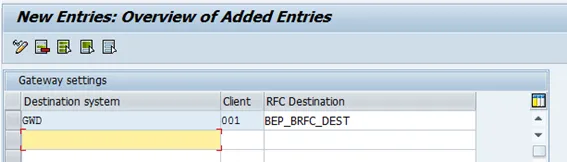
- Save